With the creation of Lapland University of Applied Sciences on January 1st, 2014, Lappia Moodle has become Lapin kampus Moodle and its familiar look will be adapted to the new situation. In preparation for these changes the Moodle environment was upgraded to version 2.5. Earlier we already announced some of the new functionality this upgrade would bring. Still, for many users it will take a little while to get used to the changed look and feel.
One of the changes that may confuse some users is the new organisation of the My home/My courses page. In order to shorten the loading time of this page for users with slower computers, the default number of courses on this page has been set at 10. For many teachers and some students this means that a number of their courses will not be displayed on the page (There will instead be a message that ”You have X hidden courses”). It is important to understand that this does not mean that you cannot access these courses anymore! All courses that you have access to will be under My courses in your Navigation block and you can always access them from there. However, it may be so that you want your active courses displayed on your My home/My courses page. That can be achieved by clicking the Customise this page button. This will allow you to
- increase the number of displayed courses and
- change the order in which the courses appear on the page
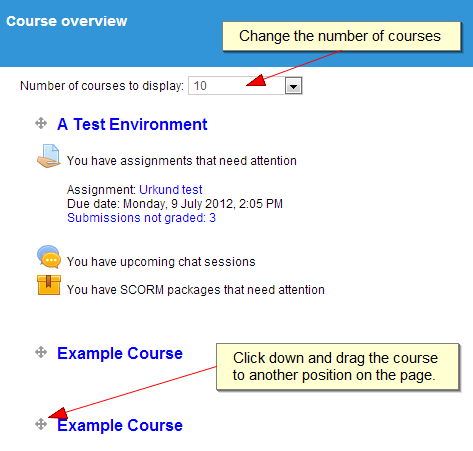 In other words you can increase your view to include all your courses and then drag the active ones to the top and subsequently set the number of courses shown back to a manageable number (i.e. less than 20). If you have in excess of 20 courses, you may want to reflect whether you still need access to all of your courses. Now may be a good moment to make a back up of some of your old courses, download those back ups for safe keeping and then request from the eLearning Services that the courses be removed, so as to create some space.
Another new feature in Moodle 2.5 is the possibility for students to submit an assignment as a group, i.e. the Group submission settings. This will create an assignment in which submissions are organised by group with all members of a group able to submit and/or edit a file (or multiple files if that is allowed) for the group. In other words, all group members see the group submission, but they cannot see the submissions of other groups. Grading and commenting remains individual.
Before an assignment can be made into a group assignment, groups must be created in Moodle and students must be added to these groups. Furthermore the groups for the assignment must be added to a grouping. This grouping can then be used in the assignment settings to enable group submission.
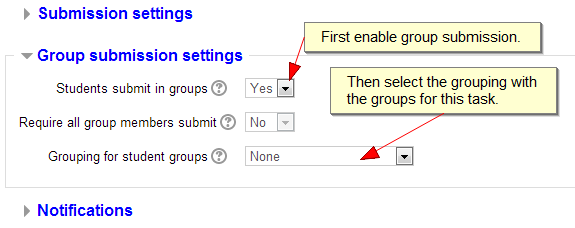
You can read more about creating groups and groupings in the Moodle manual. Students can be added to groups manually, but you can also instruct them to divide themselves over a given number of groups using the Group Choice module!