Categories
eOppimispalvelut Moodle

Moodle 3 Features, part 1 Forum

The upgrade of Lapinkampus Moodle and Open Moodle to version 3 and up will not cause drastic shifts in the functionality of the environment, but will bring about a great number of incremental improvements. Some of these improvements and additional functionality will be highlighted in this and subsequent entries.

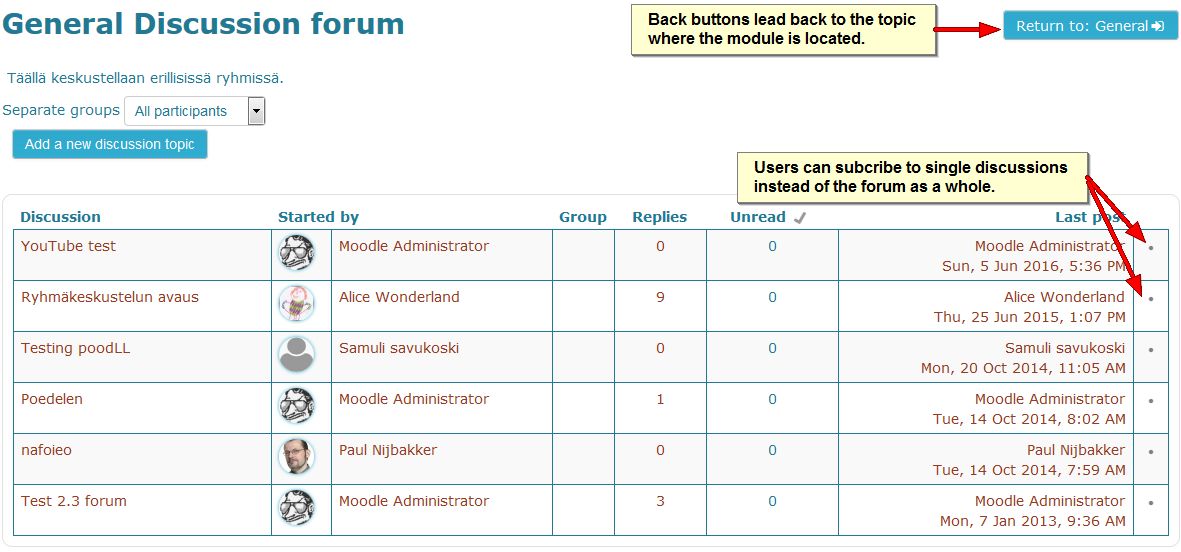
The Forum module in Moodle is the most used and most flexible tool that can perform almost all functions of the assignment module (including the Urkund plagiarism check), but combines it with the interactivity of a discussion tool. In the upgrade from Moodle version 2.7 to 3.0 the Forum will aquire a few improvements which are shown on the images below:

When writing a forum messages users in a group forum can decide to post their message in all the groups that they have access to.
When writing forum messages users in a group forum can decide to post their message in all the groups that they have access to.


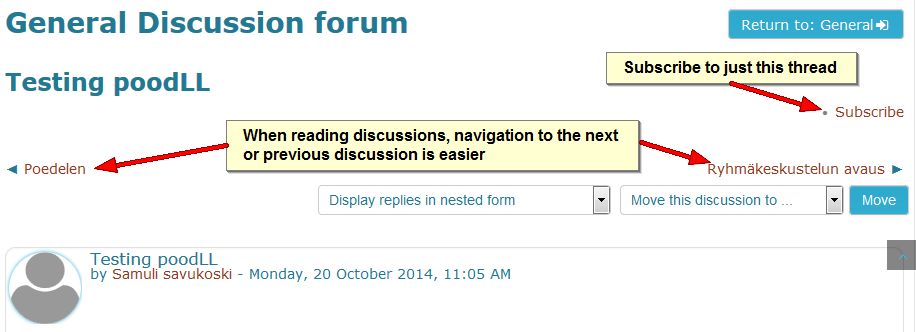
navigation between threads
In a forum it has become easier to navigate between discussion threads and it is now possible to subscribe to only one discussion.


Subscription to single threads
Subscription to single threads can also be done on the forum page. Also note that the back button now returns to the same topic you departed from.
Categories
eOppimispalvelut

eOppimispalveluiden Joulu- ja uudenvuoden tervehdykset

Kaikille / To Each and Everyone

xmas card 2015

The eLearning Services of Lapland UAS will be at your service also in 2016!

Categories
eOppimispalvelut Moodle tekninen

Ryhmäpalautus Moodletehtävässä edellyttää, että opiskelijat ovat ryhmissä!

The last few days the eLearning services have received several help requests from teachers who had created assignments in their Moodle courses and set Group submission to yes. However, they had omitted to create groups in the course and divide their students over those groups. The result is that Moodle considers all students in the course as one big group and that usually means only one of them can submit the assignment. On the assignment page it will look like this:

ryhmapalautus 1It also means that all students will see that one submission and can edit or delete it! To compound the problem, once a student has submitted in a group assignment, the setting cannot be changed anymore.

ryhmapalautus 2As indicated in the image above, the only quick solution in that case is to make a copy of the assignment and take away the group submission setting. The student(s) will then have to resubmit.

The longer solution is to go through the process of creating groups in the course (See instructions in Finnish or English) and perhaps combine those groups into a grouping (if there will be more group tasks in the course with different sets of groups). Divide the students over those groups either manually, or by allowing the students to choose their group themselves with the help of a Group Choice activity. Once all students are in their respective group, the Moodle assignment’s group submission will work properly.

Categories
eOppimispalvelut pedagoginen tekninen Verkko-oppimateriaalit

Henkilökunnan eOppimiskoulutukset / Staff Training in eLearning

Maanantaina 21/9 jatkamme verkko-opetusteeman parissa. Linkin iLinc-luokkaan ja muita ohjeita löydät täältä
https://docs.google.com/document/d/1e1u7ol_dUlSfSm6JpUVzATQ-piI-5rRQVkJrhe1zlNA/edit


eLearning in our organisation has grown from an exotic excursion for tech-savvy pioneers in education to a mainstream element in teaching at our University of Applied Sciences. From the beginning, the eLearning services have stressed that eLearning was not meant to replace face-to-face teaching but to augment it. Indeed eLearning made higher education accessible for many students who would otherwise not have been able to study. It also significantly reduced the amount of paper our teachers process in the course of an academic year. Furthermore, it has allowed a greater flexibility in time and place for both teachers and students. All these things are gains.

The downsides of eLearning should first and foremost when the opportunities offered by the paradigm are not properly exploited. Too many teachers still apply the traditional: text + assignment course set up, which in face of the opportunities offered by electronic learning, creates unnecessarily much work for the teacher. This effect is compounded by the pressure from school management to accept larger groups in on-line courses than traditional classrooms could hold. The latter makes sense from a financial point of view. However, I would like to stress, it goes against the advice of the experts!

Still, things being as they are and teachers always looking for ways to improve their teaching effort, it is highly recommendable to learn how to exploit the broad functionality of the on-line learning environments on offer to enrich, enliven and invigorate teaching and learning, while at the same time reduce the work strain put on the teacher where possible.

To this end, the eLearning Services in cooperation with the Heads of Education of Lapland UAS have set up a series of training sessions for teachers. Starting Monday 21.09.2015, these will encompass a variety of modern elements in education and match them with functionality in our learning environments. Participation is heartily recommended!

The link above gives access to the dates and topics of the training (in Finnish), as well as the iLinc classroom in which the training will be conducted.

Categories
eOppimispalvelut Moodle Urkund

Spotlight on: Open Moodle

The eLearning Services of Lapland University of Applied Sciences do not only administer Lapinkampus Moodle, the main Moodle site for the UAS and associated schools in Lapland, like Ammattiopisto Lappia. There is a second Moodle site that is geared specifically towards international project work: Lapinkampus Open Moodle. The name refers to the site being open to email-based self-registration by users in the international projects that utilise the environment, whereas Lapinkampus Moodle only allows authentication via the user registration systems of Lapland UAS and Lappia AO, or via manual account creation by the eLearning Services. The latter is an obstacle to the smooth running of projects with outside users, who would depend on help to gain access to their project environments. The separate status of Open Moodle allows easy access.

Another advantage offered by Open Moodle is that as a smaller site, it can be used as a testing ground for upgrades and new functionality. Presently, Open Moodle is already running version 2.7.8+ to which Lapinkampus Moodle will be upgraded first by the end of the month. New features in this version of Moodle have been tested out already before they will be adopted in the main Lapinkampus Moodle site. These elements comprise the functionality of the new Atto text editor that was already announced in a previous post, but also a new mathematics filter and a new STACK question type that should allow the creation of very advanced mathematical quizzes. The upgrade to 2.7.8 will also entail improvements in existing functionality. For example, URKUND anti-plagiarism checking can now also be activated for a discussion forum, meaning that both the text of forum messages as well as attached files will be sent to URKUND for checking. Other improvements will concern greater ease of use for mobile users and improvements in marking and feedback in assignments, such as the option to annotate submitted PDF files in the browser.

The upgrade of Lapinkampus Moodle is scheduled for July 1st 2015.

Categories
eOppimispalvelut Moodle

Future Prospects of Lapinkampus Moodle

The open source virtual learning environment Moodle in use at Lapland University of Applied Sciences is version 2.5 of the software. This version is no longer supported since the beginning of this year, so an upgrade is overdue. The reason why the eLearning Services decided not to upgrade during the Christmas break was that we did not want to confront the new Moodle users in Rovaniemi with too many changes in a short time frame. However, this summer, we will execute the upgrade of Lapinkampus Moodle over two branch versions to version 2.7. In this message we look forward to the differences you may expect.

First of all, the look and feel of the environment will change somewhat. Some of the old 1.9 course themes will no longer work with this version, because 2.7 requires themes to be adapted for mobile use. If you have enabled one of those old themes in your course, your course theme will be reset to the standard during the upgrade. On the other hand, several new themes will replace the obsolete ones, so that you have enough new and flexible options to choose from. Another noticeable change in appearance will be entailed by the adoption of the Atto editor as the default text editor in Moodle. This text editor is more flexible and accessible and will sport some new features like autosave.

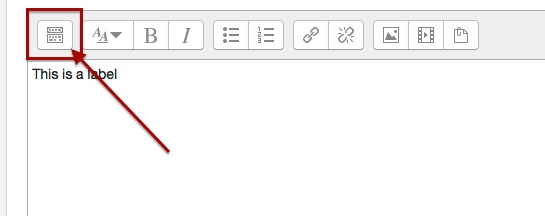
Atto editor expand menu
The button bar of the Atto editor will be collapsed (much like the editor in the WordPress blog) and can be expanded with the indicated button to show all functions.
Categories
eOppimispalvelut Moodle

Tyhjä kansio-ongelma? Empty folder issue?

KansionuoliEnglish: A small but annoying issue sometimes crops up with some users of the folder resource in Moodle. The folder seems empty of files, even though this is not the case. The solution is to click the tiny triangular icon to the left of the folder icon. This will unfold the contents of the folder. See the attached picture.

Suomeksi: Pieni mutta ärsyttävä ongelma joskus vaikutaa kansiotyökalu Moodlessa. Kansio näyttää tyhjää vaikka tämä ei ole totta. Ratkaisu on klikata pieni kolmiokuvaketta vasemmalla kansion kuvaketta. Tämä paljastuu kansion sisältöä. 

Categories
Moodle

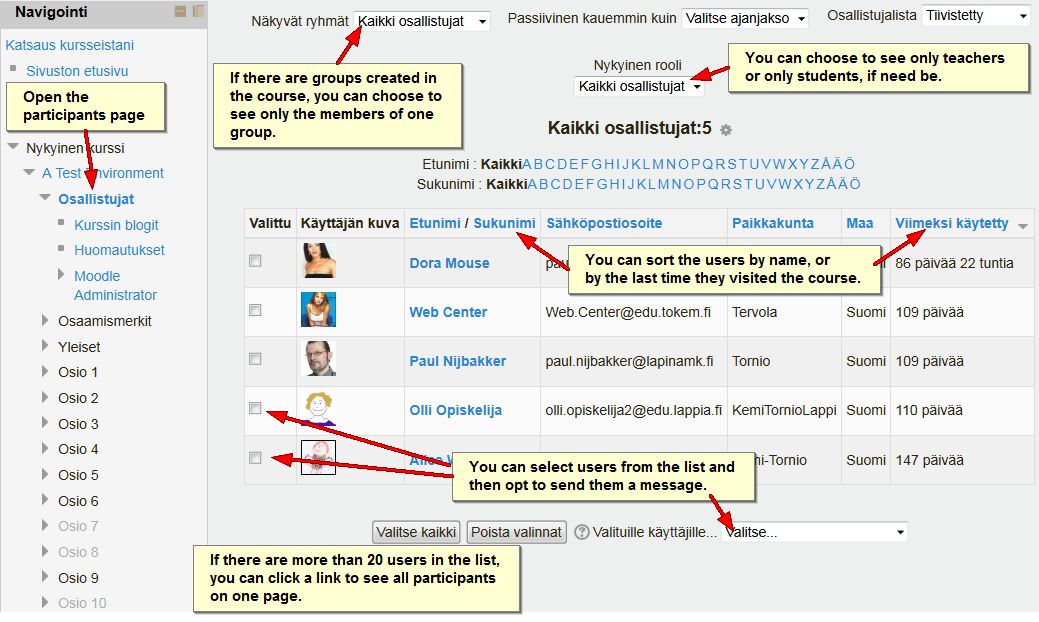
What you can do with the Participants (Osallistujat) Page

The participants page in a Moodle course give teachers several options, of which they may not be aware (click on the picture to see a bigger version):

Particpants page (click to enlarge)

Categories
eOppimiskeskus Muut

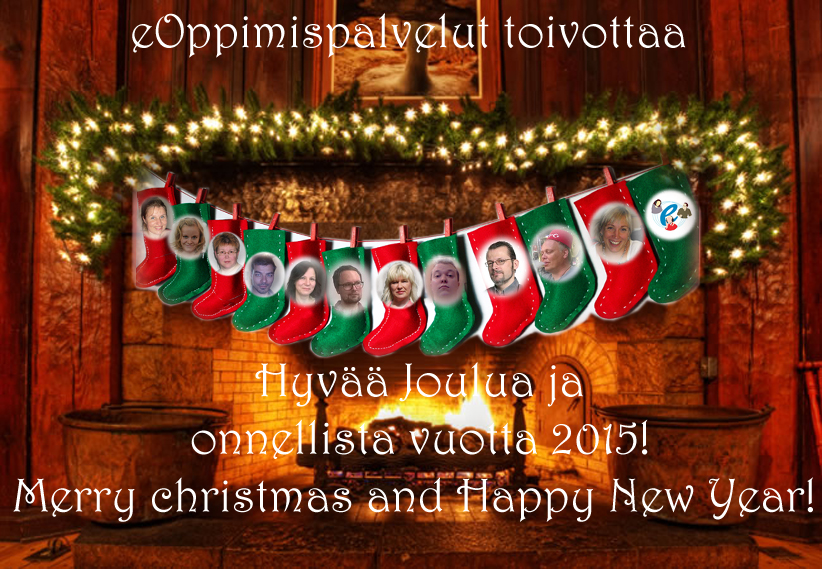
eOppimispalveluiden jouluterveydykset / eOP’s Season’s Greetings

eOP joulukortti

Also in 2015 we will support you! Tuemme myös 2015!

Categories
eOppimispalvelut Muut tekninen

Presenting PowToon

At recent seminars the eLearning Services have presented the services of Lapland University of Applied Sciences using the on-line presentation tool PowToon. PowToon is one among other popular web-based presentation tools (another is, for example, Prezi) and it has been available for free since the beginning of 2013.

The free version of PowToon requires users to register for an account and it allows subsequently the creation of stand-alone animated presentations with a maximum length of 5 minutes.

The creation process of a PowToon presentation is made up of several stages:

  1. First one must draw up the storybook, the scenario, the script, i.e. the text of your presentation.
  2. Then you record the voice over, i.e. you record yourself (or another speaker) presenting your story (max 5 minutes) and you save the audio file. If you have a suitable tool (like Audacity) you can subsequently “polish” the audio file to reduce background noise and the likes.
  3. Next you log in to PowToon and start creating a presentation in PowToon by uploading your audio file.
  4. After that you start on your first slide and lenghten or shorten the duration of the slide in accordance with your audio track. The maximum duration of a slide is 20 seconds.
  5. After setting the length of the slide you can commence adding text, pictures and animations to the slide. This is somewaht similar to creating traditional presentation slides, although it is easier to set the introduction and exit of different elements on the slide and PowToon offers an easily overviewable bank of partly animated clip art.
  6. Once the slide is done, it can be played back to check the animation and edited to make transitions smoother and more in line with the audio track.
  7. Do not forget to save after each slide!
  8. Once the presentation is complete it can be published. This presents the user with a link (see below) that can be shared in any on-line context. In addition, the PowToon presentation can be exported to YouTube, if the user has an account there.

If one disregards the intricacies of recording the audio track for the presentation, PowToon is a relatively easy tool to create an engaging, animated, on-line presentation. Easy to use does not necessarily mean is not time consuming, though. Creating a five minute stand-alone presentation in PowToon can easily cost more than a day to the inexperienced user. Hence, for any run of the mill presentation, one is better off choosing the traditional presentation tools. On the other hand, for trade fairs or for the purpose of electronic “business cards” this tool may be an attractive option.

Incidentally, it is also possible to use PowToon in a traditional way as background to a personal presentation, although it is not the most suitable tool for that.

The link below opens an example of a PowToon presentation created off the cuff by yours truly for a language teaching seminar:

http://www.powtoon.com/show/djda89ftHRd/elearning-services-and-language-teaching/