Categories
eOppimiskeskus Moodle

The MOO in Moodle

Officially, “MOODLE” stands for Modular Object-Oriented Distributed Learning Environment, but, with a wink to the latest developments in eLearning, the “MOO” could just as well stand for Massive, Open and Online. Moodle’s international user base is massive indeed. Moodle is used in more countries and more languages than any other learning environment. This implies there is a huge international community of Moodle users who have an interest in the maintenance and development of this software. As Moodle is open source, people from all over the world can and do partake in various ways in the development, online via the web site moodle.org. There, all users are welcome to share problems and wishes, fixes and solutions, and learn from each other.  Without exaggeration one can claim that the Using Moodle course at moodle.org has effectively  been a MOOC since before the concept had even been invented!

From an early stage, Moodle has won the support of dedicated companies, Moodle partners, in many countries, which work to support Moodle use in their respective regions, including Finland. Many prestigious institutes of education have adopted Moodle as part of their core services. Prominent among these is one of the largest universities in Europe, the British Open University, with a massive user-base of over 250 000 satisfied online students* dispersed over many countries. (Incidentally, the absolutely largest university in the world, IGNOU in India, with more than 3 million students, also uses Moodle!)  Even in the North of Europe Moodle is widely used in institutes of tertiary education. Let’s have a look at a list of universities in the North and their learning environments (from West to East):

Norway (173 registered Moodle sites)

  • University of Tromsø + HIFM (Fronter)
  • University of Nordland + HIBO (Fronter)
  • Harstad University College (Fronter)
  • Narvik University College (It’s Learning)
  • Nesna University College (Moodle)

Sweden (266 registered Moodle sites)

  • Luleå Technical University (Fronter + Moodle)
  • Mid Sweden University (Moodle)
  • Umeå University (Cambro + Moodle)

Finland (348 registered Moodle sites)

  • Oulu University of Applied Sciences (XXX** + Moodle)
  • Oulu University (XXX** + Moodle)
  • Lapland University (XXX** + Moodle)

Russian Federation (Over 1500 registered Moodle sites)

  • Murmansk State Humanities University (Moodle)
  • Murmansk State Technical University (Correspondence?)
  • Northern (Arctic) Federal University (Moodle)

What can we tell from this list? Well, for one thing it shows that Moodle is the only learning environment that is used in all four Barents countries. In Norway the Norwegian products Fronter and It’s Learning have all but cornered the market, but they are very expensive. Hence, in their projects with us, the Norwegian schools always use our Moodle, because extra seats in their commercial VLEs would cost too much. This is a problem with commercial providers in general. In Sweden the choice of learning environment is more eclectic, but open source is widely used (Cambro, for example, is based on open source Sakai). In northern Finland the commercial product XXX** is in use at all universities, but all these organisations use Moodle on the side, which in itself is already an indicator that XXX** is not an optimal solution. Many institutes of tertiary education in the Russian Federation use Moodle, because of the low cost involved and the fact that Moodle was available in Russian at an early date (and to some extent also, because they became acquainted with Moodle through online projects with Kemi-Tornio UAS).

Categories
eOppimiskeskus Moodle Optima

Moodle or XXX* = Mersus versus Lada

Imagine, dear reader, that you need to choose a car and in the village where you live there are two car dealerships. The dealer nearest to your home offers you a brand new Mercedes for free and then there is another dealer who offers you a Lada for a lot of money. The choice already seems obvious, but some people in your family seem to think that it does not really matter which one you choose. After all, they say, both the Mercedes and the Lada have four wheels and they both can take you from A to B. That is true, of course, so let us then look a little closer at the cars on offer.

The Lada may not go the distance...
The Lada may not go the distance…

The Mercedes is the most widely used car in the world and many people own several of them, because they are given away for free. The Lada is unfortunately only available from this one dealer in your village and it costs a lot of money; there are consequently few of those cars on the road. Even in your village there are more Mercedes owners than Lada drivers. International comparative polls show that Mercedes owners are very satisfied with their car. Lada has not participated in such polls.

There are Mercedes dealerships in all countries, but you do not have to use them. If you should have a problem with the car, you can get it fixed anywhere you choose, or you can even fix it yourself. The Lada dealer on the other hand does not allow you to fix the car yourself, you are not even allowed to look at the engine! If it breaks down, you must take the car to this one dealer to have it fixed.

The Lada dealer is also the only one who sells a few accessories for the Lada, while you can get hundreds of free accessories for the Mercedes at many shops. The Mercedes also comes in many different colours and models. The Lada on the other hand is available only in one drab colour and the interior design is still the same as it was when the Soviet Union still existed.

The Mercedes offers a very flexible form of transportation. It can carry a handful of primary school children or thousands of university students without any additional cost. In contrast, although the Lada can carry multiple passengers too, you have to pay the dealer for every extra seat. All things considered, although you are allowed to drive the Lada, it is never really your own. The Mercedes, however, is yours to do with as you please, a home away from home.

Finally, the Mercedes is also clearly the more modern car. It includes options for interfacing with the latest technologies, which the Lada lacks. The Mercedes in other words will take you much further than the Lada will. The Lada dealer knows this very well, for he also sells Benz cars (which are just Mercedes cars with another name). The Lada will soon be a thing of the past.

Which car would you choose, dear reader?

Categories
eOppimiskeskus Muut

My MOOC Experience

It finally happened! This staff member of the eLearning Centre of Kemi-Tornio UAS completed a MOOC. Well, to be exact, I completed two simultaneously! 🙂 A MOOC is a Massive, Open, On-line Course. The model was developed in the past few years and it had its breakthrough in 2012. The idea behind it is to offer high-level education, for free, to very large student populations worldwide via the Internet. The biggest MOOCs have more than 100 000 enrolled students. This implies that contact between teachers and students must necessarily be very limited and this, in turn, increases demands on the course material to be interactive. There are two main approaches to this. One is crowd-sourcing, in other words the students teach each other with a minimum of online sources provided. These courses rely heavily on on-line discussion and peer-evaluation. The other approach is to create recorded lectures with accompanying interactive study materials.

Categories
eOppimiskeskus Muut

A Modest Proposal for Support Requests

The eLearning Centre of Kemi-Tornio University of Applied Sciences serves all the schools associated with the Lapland University Consortium and with the Lappia Municipal Education and Training Consortium. Users of the learning environments in use at these organisations regularly convey requests for technical and/or pedagogical support to us. They can do this in person at the eOK office in the Minerva building in Tornio, or via telephone, or email, or the Moodle messenger, or some other channel depending on their need and the urgency of the issue at hand. We at eOK receive the requests and often assign them to the best person for the task, so as to use our (wo)man power in the most efficient way. Hence, users often get a response from someone else than the eOK staff member they initially contacted. In very busy times of the year we also practice triage, that is, less pressing matters are put aside for later consideration, so as to allow us to spend time on the most serious issues first. Nevertheless, we strive to take up and hopefully solve every support request that reaches us in the most expedient manner.

Categories
eOppimiskeskus Moodle tekninen

Introducing the Collapsed Topics course format

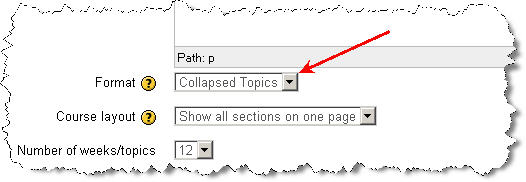
The new version of Moodle, while incorporating much neat new functionality, also omitted some small functions that were familiar to Moodle 1.9 users. One of those functions was the collapse topic icon, with which topics on a course page could be collapsed so that only one topic showed. This function was helpful to reduce the amount of scrolling on long course pages, even if it also gave rise to some confusion when new users accidentally clicked the icon.Selecting the Collapsed Topics course format

In Moodle 2.3.2 the collapse topic function has been incorporated in a new course format, called Collapsed Topics. This course format can be chosen in the course settings, as shown above. The Collapsed Topics course format allows users to collapse and unfold course topics at will. They can also close or open all topics with one click, as shown in the picture below. Also note that the default setting is that the current section (Set by highlighting it with the light bulb icon in editing mode) always comes first.

Categories
Moodle tekninen

Moodle 2 the Repositories

One of the major differences between Moodle 2 and the familiar 1.9 version is the totally new file system. In Moodle 1.9 files in a course were either uploaded to the course Files and then linked to various places in the course, or they were linked from the Internet. The latter was a laborious process of finding the resource on the Internet, copying the link and adding it in a Moodle resource. This made it impractical to have too much material on the Internet and consequently the course Files folders filled up with files.

To deal with this Moodle 2 introduced the new file system that still can link to Internet pages or pictures in the old way, but that has a decided advantage in that it can also use so-called repositories. Repositories are internal (i.e. inside Moodle) or external databases where files are stored. The new File picker can connect to those repositories, so that you can link to, or upload, these files in your course material, straight, often without the need to log in to outside sites and without needing to upload files downloaded elsewhere.

The File Picker
The Moodle 2 File picker with on the left a selection of available repositories.

There is a list of available repositories in Lappia Moodle. The internal repositories comprise the old Legacy course files folder, the Recent files, your Private files and the Server files. It depends on where you are in Moodle and what your role, or level of access, is, whether you can see all of these in your File picker. The external repositories include Google docs, Dropbox, Wikimedia (picture database of Wikipedia), Picasa (picture database) and YouTube (video database). The list of repository plugins is however much longer and contains services like Alfresco, Box.net, WebDAV, Amazon and Flickr. These can be added to Lappia Moodle upon request from the users. In addition there is a plugin to include any file folder in the Moodle server as a repository.

You cannot upload files to repositories via Moodle, but your can draw files from the repositories into Moodle. Repositories are thus the opposite of portfolios, that are meant to save files from Moodle. Presently, Lappia Moodle utilises only the Mahara e-portfolio. In the foreseeable future Mahara may also become available as a repository.

Categories
eOppimiskeskus Moodle tekninen

Start the School Year in Moodle 2.3.

Users of the Moodle environments administered by the eLearning Centre of Kemi-Tornio University of Applied Sciences will this August discover that their familiar Moodle 1.9 has been upgraded no fewer than four branch versions to Moodle 2.3.1! This upgrade represents a major leap forward in functionality in Moodle, but inevitably it will also take some time getting used to the changes. New functionality in Moodle 2.3 (in addition to the features announced earlier, such as the Navigation and Settings blocks, conditional access and course completion and the file system with repositories and portfolios) comprises an all new assignment module that includes in one settings interface all the functionality of the four traditional assignment types. The Urkund anti-plagiarism service can be activated too from this settings page (The separate Urkund assignments have been deleted). Uploading files to Moodle has become easier in Moodle 2.3, because drag and drop uploading has been activated across the site (This works with all modern browsers, but not with Internet Explorer 9 or older).

The new drag and drop interface
The new drag and drop interface to upload files to Moodle. Note that traditional uploading via the File picker is still possible via the Add function.

Needless to say, an upgrade over four branches will entail the loss of certain contributed functionality that existed in Moodle 1.9. The Urkund assignment module is gone, as announced above. The obsolete Journal module too was left behind. The eMail-list block is another element that has not been updated for use in Moodle 2.3 yet and, hence, will be missing from the site. Of other modules certain instances that were corrupted in one way or another, have been deleted from Moodle and the Moodle database. In other words, teachers in Lappia and Lapin verkkokoulu Moodle should check their courses carefully and be prepared to make repairs or modifications.

The eLearning Centre is as always at your service to answer any questions you might have and to offer hands on help and training where needed.

Categories
eOppimiskeskus iLinc Lappia Blog Lappia Wiki Mahara Moodle Verkko-oppimateriaalit

Summer Upgrade Timetables and what to expect

Dear readers of the Viikon e-vinkki blog, the summer of 2012 will see upgrades of practically all learning environments administered by the eLearning Centre of Kemi-Tornio University of Applied Sciences. The eLearning Centre will do its utmost to limit possible inconvenience for useres, but all who will be using the environments should be prepared for temporary interruptions in service.

Moodle

The Linux operating system of the Moodle server, which runs Lappia Moodle, Lapin verkkokoulu Moodle and Lappia Open Moodle will be renewed in the Month of June (9 and 10 June to be exact). Any interruptions in service will affect all three Moodle installations and the Mahara installations networked with two of them.

After testing the new operating system, Lappia Moodle and Lapin verkkokoulu Moodle will be upgraded from version 1.9.+ to version 2.2.+ (or even straight to version 2.3.+) at the end of June (18 and 19 June to be exact). The move to Moodle 2 has been announced in several earlier articles in this blog (here, here, here, here and here). It will be the largest stride in terms of new functionality so far in the development of Moodle and all users should prepare themselves for it as best they can. One way to familiarise yourselves with Moodle 2 is to create an account in Lappia Open Moodle, which has been in version Moodle 2.2.+ since the beginning of this year.

The upgrade of the Moodle installations will be preceded by a rigorous clean-up operation. All courses that are without teachers will be permanently deleted! If you have lost access to some of your courses, it is very important to contact the eLearning Centre with the full title of your course(s) so that you can be returned to your course(s) before they are deleted. A circular message about this will follow (in Finnish). In addition to removing empty courses, all inactive users will be deleted from the database. If you have not been active in Moodle during the past year, you may want to log in to avoid being deleted!

The Moodle 2 upgrade may affect learning matter that you have in your courses. in certain cases links may be broken and will have to be restored. It would be therefore advisable to check your course materials in Moodle well in advance of the start of the autumn semester to ensure all works as it should. The help of the eLearning Centre can be enlisted if problems have occurred after the upgrade.

Summing up, all staff who use Moodle should prepare for the coming upgrade, to minimise the risk of surprises. Those who have planned using Moodle in summer education during the month of June should be prepared for interruptions in service and, where possible schedule their teaching around them. The exact dates and times for the upgrades will be announced among other places on the page www.etukipalvelut.fi.

Mahara

The e-portfolio Mahara will be even more closely integrated with Moodle during the summer. When Moodle will be upgraded to version 2.3.+ Mahara will be upgraded to version 1.5.+ . We estimate this will be in the beginning of July. At this point two-way uploading and downloading between the environments should be possible, making Mahara a true repository for all course work carried out in Moodle and making Mahara for alumni a reality.

iLinc

iLinc is due to be upgraded to version 11 during the summer of 2012. A new server will be installed for the purpose. iLinc 11 will feature an adapted interface, improved audio codec and, not in the last place, an integration with Moodle, so that users can acces iLinc directly from their Moodle courses.

Wiki and Blog

Finally, Lappia Wiki and Lappia Blog are also likely to be upgraded during the summer, July being the scheduled month, but these upgrades should not entail serious changes in functionality or any lengthy interruptions in service.

And finally

The whole system of usernames and passwords at the Lappia consortium will be overhauled during the month of July as part of the integration of the theLappia computer network into the LUC network with the networks of Lapland University and Rovaniemi UAS. This operation, which is carried out by the IT services of Lappia, will also entail interruptions in the accessibility of the learning environments administered by the eLearning Centre. These interruptions will also be announced in advance.

Categories
eOppimiskeskus Moodle tekninen

Moodle 2: Restrict access and Activity completion

Moodle 2 offers a host of new functionality when compared with version 1.9. One of the options that users have been demanding for a long time is the possibility to make course resources and activities interdependent. That is, course activities become accessible to students only under certain conditions, for example, that they have completed another activity and/or obtained a certain grade for it.

In Moodle 1.9 only the Lesson module had this functionality (i.e. access to a lesson could be made dependent on success in another lesson. Moodle 2 has extended this functionality to all activities and resources in a course. If you want students to read a document before they attempt an assignment, you can make the assignment access dependent on the students having viewed the document. If you have a series of related quizzes in a course, you can stop students from accessing quiz 2, before they have completed quiz 1. And so on.

Restrict access settings in an assignment
As you can see access to an activity can be made dependent on dates and/or a certain grade in another activity and/or completion of another activity or resource.

In the above completion is already mentioned as one of the conditions upon which you can make access to course activities or resources depend. Activity completion is related to the Restrict access function, but can be used independently. The advantage of using activity completion is that students can track their course completion, in a block called Course completion status, i.e. they can see if they have done all the tasks required of them in the course.

Activity completion settings in an assignment
The activity completion settings determine when this particular activity will be considered completed. Do the users merely need to see the task, or do they need to obtain a grade (before a certain date)? And are they allowed to mark the task as complete themselves, or can only Moodle do so?

Does this all look and sound too difficult? No worries, you can then ignore the Restrict access and Activity completion settings whenever you add an activity or resource and it will work normally as in Moodle 1.9.

Categories
Moodle tekninen

Moodle 2: File picker

The new version of Moodle is different in certain important ways from the familiar 1.9 structure. One of the main differences is in the way Moodle 2 deals with uploaded files.

The old 1.9 file system worked with course Files, i.e. users would upload files to a course Files area, where they could organise and mange those files, and they could then link to those files from various pages in the course. Moodle 2 largely does away with course Files. Now files are uploaded to the very place where they are shown, i.e. a file shown on the course page is uploaded to the file resource that displays it and nowhere else. This can lead to confusion for those who are used to the old file system, as they will find their files more difficult to overview and manage. However, for most it will be no more complex than the old system.

The old course Files have been retained in Moodle 2 under the name Legacy course files. However, they do not work exactly the same way as before. While it is possible to upload and organise files there and link to them, you cannot update or delete files in the course by updating or removing them from the Legacy course files!

So, why the new file system? Well, first of all, it is much more secure and easier on the server, which pleases the server administrators. From the user’s point of view the new file system opens greatly increased options to use all kinds of online repositories and embed content from those directly in Moodle. In other words, with the new file system you can, for example, link directly to pictures in Flickr or WikiMedia commons or to videos in YouTube or documents in Google docs and so on.

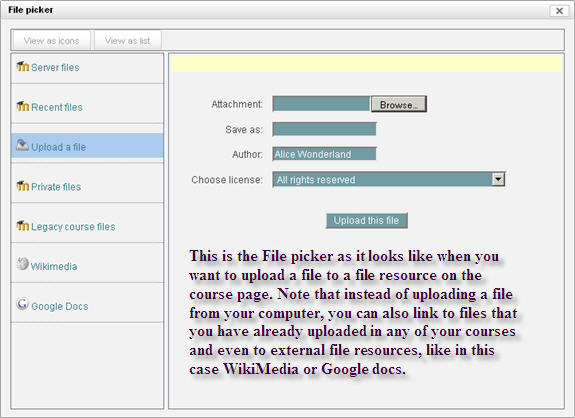
All linking to files is done via one pop-up interface, the File picker, which adapts to the kind of content you want to add (e.g. if you click the Insert image icon in the button bar of the editor and go to upload a file, the file picker will show for example WikiMedia as a repository, but not Youtube, because the latter does not contain any pictures).

The File picker
Note that if you activate the Drag & Drop block in your course, you can bypass the File picker and simply drag files from your computer and drop them in Moodle!

As mentioned in the picture, the File picker gives you access to files in all your courses, so it is possible via the Server files option to browse to a file that you uploaded in a resource in another course and add it to your new course.

Summing up, the new file system in Moodle 2 will be experienced as a challenge by those who are used to the old file system, but it once the users have familiarised themselves with the file picker, the new system offers vastly increased functionality.

As a footnote, we should add that the drag & drop functionality that the eLearning Centre will add to Moodle 2 will enable users to bypass the file picker entirely when they upload files to Moodle. This may for many be a more user-friendly way of putting files in their courses.