Näin säädät viesti asetuksia:
1. Valitse Asetukset
2. Omat profiiliniasetukseni
3. Viestit
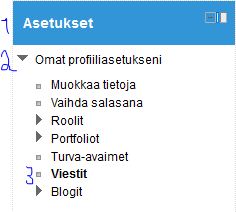
4. Valitse avautuvasta ikkunasta sinulle sopivat vaihtoehdot
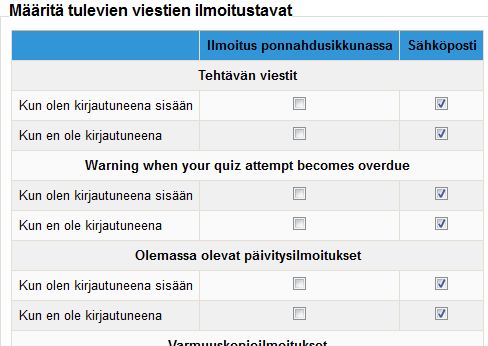
5. Tallenna muutokset
All Moodle-related tips
Näin säädät viesti asetuksia:
1. Valitse Asetukset
2. Omat profiiliniasetukseni
3. Viestit
4. Valitse avautuvasta ikkunasta sinulle sopivat vaihtoehdot
5. Tallenna muutokset
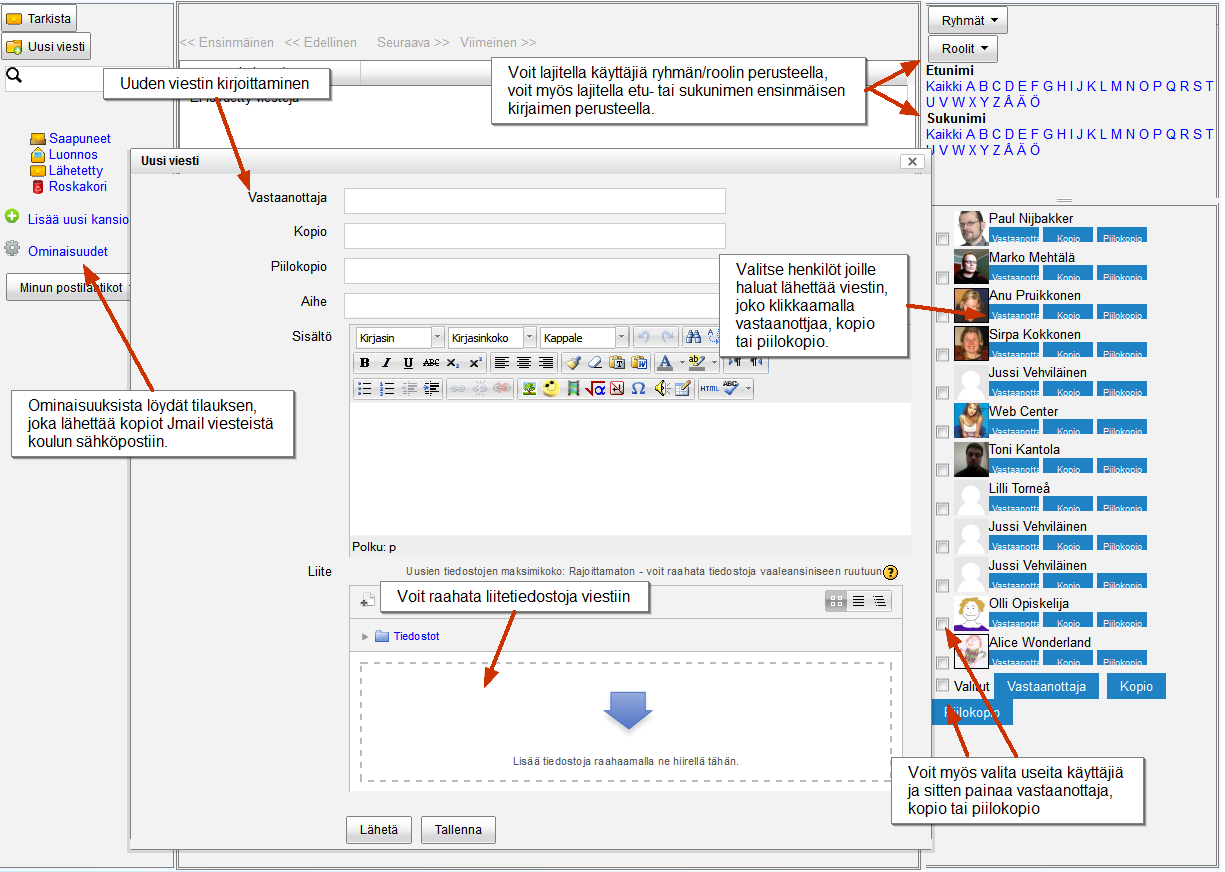
Lappia Moodle:ssa on Pikaviesti lohko, jonka avulla opettajat voivat lähettää sähköpostia ilman/liitteiden kanssa yhdelle tai useammalle opiskelijoille kerrallaan. Valitettavasti Pikaviesti lohkoa on vaivannut vika joka estää opiskelijoita käyttämästä lohkoa. Tämän takia olemme nyt asentaneet uuden Jmail lohkon Moodleen.
Jmail muistuttaa vanhaa Email list lohkoa Moodle 1.9:ssä. Jmail on lohko, joka luo sähköposti järjestelmän kurssin sisälle Saapuneet, luonnos ja lähetetyt -kansion ja roskakorin. Käyttö on helppoa, koska me kaikki tunnemme miten sähköposti toimii. Toisin kuin vanha Email list, Jmail lohko mahdollistaa tilauksen eli käyttäjät saavat kopiot Jmail viesteistä koulun sähköpostiin.
Introducing the all-new Jmail block
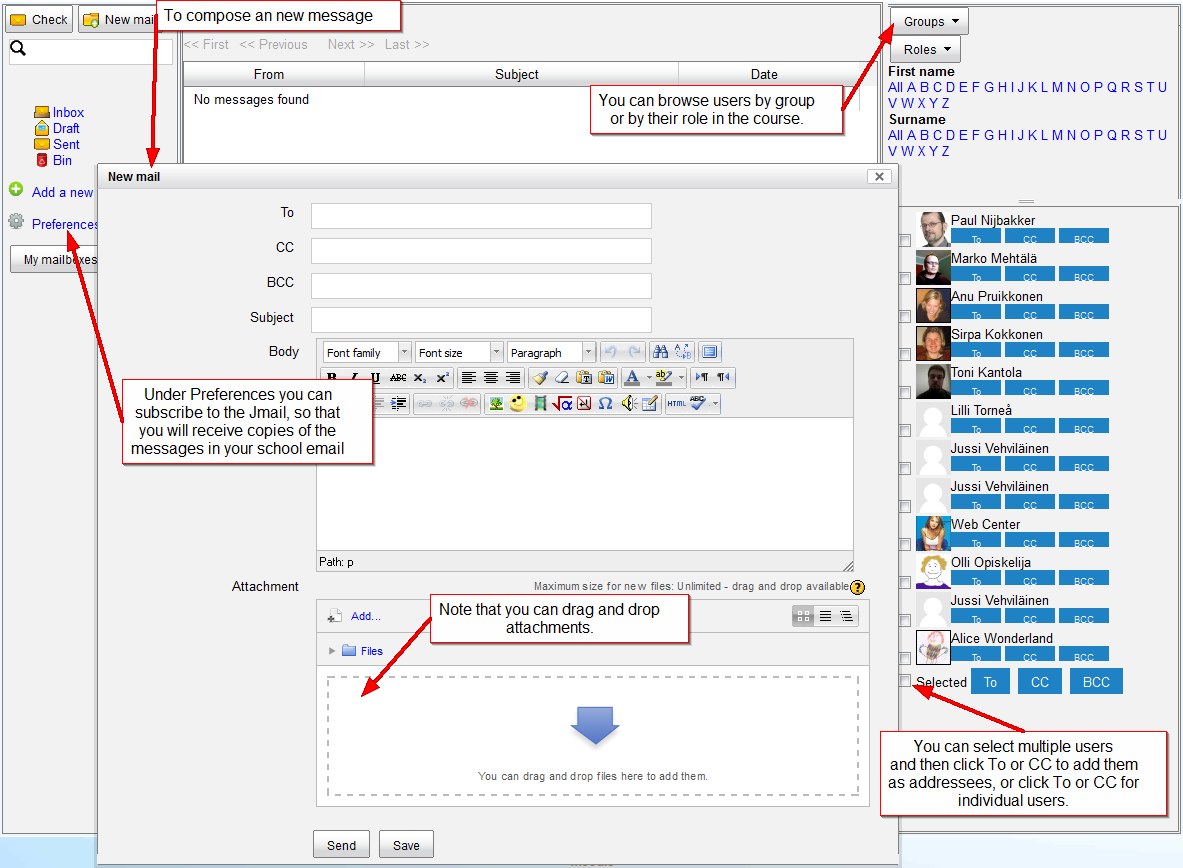
Lappia Moodle includes the contributed Quickmail block that allows teachers to send email with or without attachments to one or more students at a time. Unfortunately, the Quickmail block is plagued by a bug that blocks students from using the block. On account of this we have now installed the Jmail block in our Moodle sites.
Jmail is reminiscent of the old eMail list block in Moodle 1.9. It is a block that creates an email system inside a course complete with inbox, draft and sent folders and a trash bin. The basic use speaks pretty much for itself, as all of us are familiar with email. Unlike the old eMail list, the Jmail block allows subscription, i.e. receiving copies of Jmail messages in your school email.
The new version of Moodle, while incorporating much neat new functionality, also omitted some small functions that were familiar to Moodle 1.9 users. One of those functions was the collapse topic icon, with which topics on a course page could be collapsed so that only one topic showed. This function was helpful to reduce the amount of scrolling on long course pages, even if it also gave rise to some confusion when new users accidentally clicked the icon.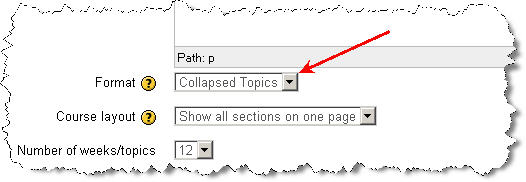
In Moodle 2.3.2 the collapse topic function has been incorporated in a new course format, called Collapsed Topics. This course format can be chosen in the course settings, as shown above. The Collapsed Topics course format allows users to collapse and unfold course topics at will. They can also close or open all topics with one click, as shown in the picture below. Also note that the default setting is that the current section (Set by highlighting it with the light bulb icon in editing mode) always comes first.
One of the major differences between Moodle 2 and the familiar 1.9 version is the totally new file system. In Moodle 1.9 files in a course were either uploaded to the course Files and then linked to various places in the course, or they were linked from the Internet. The latter was a laborious process of finding the resource on the Internet, copying the link and adding it in a Moodle resource. This made it impractical to have too much material on the Internet and consequently the course Files folders filled up with files.
To deal with this Moodle 2 introduced the new file system that still can link to Internet pages or pictures in the old way, but that has a decided advantage in that it can also use so-called repositories. Repositories are internal (i.e. inside Moodle) or external databases where files are stored. The new File picker can connect to those repositories, so that you can link to, or upload, these files in your course material, straight, often without the need to log in to outside sites and without needing to upload files downloaded elsewhere.

There is a list of available repositories in Lappia Moodle. The internal repositories comprise the old Legacy course files folder, the Recent files, your Private files and the Server files. It depends on where you are in Moodle and what your role, or level of access, is, whether you can see all of these in your File picker. The external repositories include Google docs, Dropbox, Wikimedia (picture database of Wikipedia), Picasa (picture database) and YouTube (video database). The list of repository plugins is however much longer and contains services like Alfresco, Box.net, WebDAV, Amazon and Flickr. These can be added to Lappia Moodle upon request from the users. In addition there is a plugin to include any file folder in the Moodle server as a repository.
You cannot upload files to repositories via Moodle, but your can draw files from the repositories into Moodle. Repositories are thus the opposite of portfolios, that are meant to save files from Moodle. Presently, Lappia Moodle utilises only the Mahara e-portfolio. In the foreseeable future Mahara may also become available as a repository.
Users of the Moodle environments administered by the eLearning Centre of Kemi-Tornio University of Applied Sciences will this August discover that their familiar Moodle 1.9 has been upgraded no fewer than four branch versions to Moodle 2.3.1! This upgrade represents a major leap forward in functionality in Moodle, but inevitably it will also take some time getting used to the changes. New functionality in Moodle 2.3 (in addition to the features announced earlier, such as the Navigation and Settings blocks, conditional access and course completion and the file system with repositories and portfolios) comprises an all new assignment module that includes in one settings interface all the functionality of the four traditional assignment types. The Urkund anti-plagiarism service can be activated too from this settings page (The separate Urkund assignments have been deleted). Uploading files to Moodle has become easier in Moodle 2.3, because drag and drop uploading has been activated across the site (This works with all modern browsers, but not with Internet Explorer 9 or older).

Needless to say, an upgrade over four branches will entail the loss of certain contributed functionality that existed in Moodle 1.9. The Urkund assignment module is gone, as announced above. The obsolete Journal module too was left behind. The eMail-list block is another element that has not been updated for use in Moodle 2.3 yet and, hence, will be missing from the site. Of other modules certain instances that were corrupted in one way or another, have been deleted from Moodle and the Moodle database. In other words, teachers in Lappia and Lapin verkkokoulu Moodle should check their courses carefully and be prepared to make repairs or modifications.
The eLearning Centre is as always at your service to answer any questions you might have and to offer hands on help and training where needed.
Moodle kakkoseen (2.3) joka meilläkin on syksyllä käytössä, tulee muutamia muitakin elämää helpottavia toimia, kuin joita viimeaikaisissa eVinkeissä on esitelty. Yksi pieni mutta kätevä uusi ominaisuus tulee olemaan pelkkä otsikon muokkaus: nykyisessä versiossa täytyy avata koko tehtävän tai materiaalin muokkausikkuna jos haluaa muokata kohteen nimeä, mutta uuteen Moodleen tulee työkalu, jolla saa auki ihan vain nimenmuokkauskentän samalla sivulla pysyen. Hurraa!
Uudessa Moodlessa voi myös säätää oman kurssinsa etusivun näkymän siten, että kaikki aiheet näkyvät otsikkotasolla kurssin etusivulla ja kun aiheen otsikkoa napsauttaa hiirellä, avautuu vain tämä yksi aihe sisältöineen sivulle, jolloin vältytään sivun vierittämiseltä ja asiat pysyvät ehkä hallittavampina, kun näkyvissä on vain yhden aiheen materiaalit, tehtävät ja muut aktiviteetit kerrallaan.
Kuvia näistä näkymistä en tähän laita, koska meilläkään eOppimiskeskuksessa ei vielä ole tuota 2.3-versiota käytössä mutta tästä linkistä löytyvässä englanninkielisessä videossa näkyy sekä nämä kaksi uutuutta, että muutama muukin uusi kätsy toiminto.
eVinkki ilmestyy tälle lukuvuodelle vielä viikon päästä maanantaina mutta tässä alla kuvan muodossa jo hieman esimakua kesään virittäytymiseen. Hyvää kesän alkua kaikille!

Uudessa Moodle 2 versioissa opettajat pystyvät kirjautumaan omalla avaimella toisten opettajien kurssiympäristöihin opettajiksi. Enään ei kurssia hallinnoivan opettajan ei tarvitse lisätä toista opettajaa käsin, vaan hän määrittelee opettajille oman avaimen, jolla he kirjautuvat kurssille.
Kurssia hallinnoiva opettaja määrittelee avaimen seuraavasti: Asetukset -> Käyttäjähallinta ->Osallistujien lisäämistavat ->Lisää rekisteröitymistapa ->Valitse itserekisteröityminen ->määrittele: nimi, kurssiavain, rooli

Kurssille kirjautuva opettaja kirjautuu saamallaan avaimella seuraavasti: Hakee kyseisen kurssin “Etsi Kursseja” toiminnolla -> Klikkaa kurssin nimeä ->Kurssialueelle liittyminen kohdassa, kirjoittaa avaimen kohtaan ” Ope sisään”

Dear readers of the Viikon e-vinkki blog, the summer of 2012 will see upgrades of practically all learning environments administered by the eLearning Centre of Kemi-Tornio University of Applied Sciences. The eLearning Centre will do its utmost to limit possible inconvenience for useres, but all who will be using the environments should be prepared for temporary interruptions in service.
The Linux operating system of the Moodle server, which runs Lappia Moodle, Lapin verkkokoulu Moodle and Lappia Open Moodle will be renewed in the Month of June (9 and 10 June to be exact). Any interruptions in service will affect all three Moodle installations and the Mahara installations networked with two of them.
After testing the new operating system, Lappia Moodle and Lapin verkkokoulu Moodle will be upgraded from version 1.9.+ to version 2.2.+ (or even straight to version 2.3.+) at the end of June (18 and 19 June to be exact). The move to Moodle 2 has been announced in several earlier articles in this blog (here, here, here, here and here). It will be the largest stride in terms of new functionality so far in the development of Moodle and all users should prepare themselves for it as best they can. One way to familiarise yourselves with Moodle 2 is to create an account in Lappia Open Moodle, which has been in version Moodle 2.2.+ since the beginning of this year.
The upgrade of the Moodle installations will be preceded by a rigorous clean-up operation. All courses that are without teachers will be permanently deleted! If you have lost access to some of your courses, it is very important to contact the eLearning Centre with the full title of your course(s) so that you can be returned to your course(s) before they are deleted. A circular message about this will follow (in Finnish). In addition to removing empty courses, all inactive users will be deleted from the database. If you have not been active in Moodle during the past year, you may want to log in to avoid being deleted!
The Moodle 2 upgrade may affect learning matter that you have in your courses. in certain cases links may be broken and will have to be restored. It would be therefore advisable to check your course materials in Moodle well in advance of the start of the autumn semester to ensure all works as it should. The help of the eLearning Centre can be enlisted if problems have occurred after the upgrade.
Summing up, all staff who use Moodle should prepare for the coming upgrade, to minimise the risk of surprises. Those who have planned using Moodle in summer education during the month of June should be prepared for interruptions in service and, where possible schedule their teaching around them. The exact dates and times for the upgrades will be announced among other places on the page www.etukipalvelut.fi.
The e-portfolio Mahara will be even more closely integrated with Moodle during the summer. When Moodle will be upgraded to version 2.3.+ Mahara will be upgraded to version 1.5.+ . We estimate this will be in the beginning of July. At this point two-way uploading and downloading between the environments should be possible, making Mahara a true repository for all course work carried out in Moodle and making Mahara for alumni a reality.
iLinc is due to be upgraded to version 11 during the summer of 2012. A new server will be installed for the purpose. iLinc 11 will feature an adapted interface, improved audio codec and, not in the last place, an integration with Moodle, so that users can acces iLinc directly from their Moodle courses.
Finally, Lappia Wiki and Lappia Blog are also likely to be upgraded during the summer, July being the scheduled month, but these upgrades should not entail serious changes in functionality or any lengthy interruptions in service.
The whole system of usernames and passwords at the Lappia consortium will be overhauled during the month of July as part of the integration of the theLappia computer network into the LUC network with the networks of Lapland University and Rovaniemi UAS. This operation, which is carried out by the IT services of Lappia, will also entail interruptions in the accessibility of the learning environments administered by the eLearning Centre. These interruptions will also be announced in advance.
Näin loppukeväästä tutustuminen uuteen Moodle-versioon on käynnissä ja sieltä löytyy monia kivoja uusia ominaisuuksia. Yksi minua miellyttävä ominaisuus on Vedä ja pudota -lataus 🙂 Sen avulla voit helposti lisäillä aineistoa, tekstiä ja linkkejä kurssillesi.
Jotta tämä toiminto on mahdollista, tulee Vedä ja pudota -lataus lohko ottaa käyttöön kurssilla, sehän löytyy muokkaustilan ollessa päällä sivun oikeasta alakulmasta.
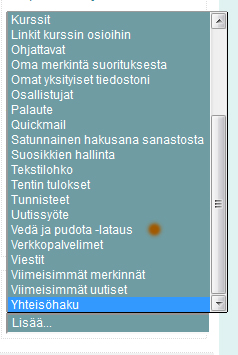
Kun lohko on otettu käyttöön, voi raahaaminen alkaa, mutta vain ja ainoastaan muokkaustilan ollessa päällä. Jos haluat siirtää jonkin tiedoston koneeltasi Moodlen kurssille, avaa kyseinen kansio, ota tiedostosta kiinni ja raahaa se sopivaan kohtaan kurssiympäristössä. Tiedosto latautuu hetkessä Moodleen ja on katsottavissa. Tekstin siirtäminen käy yhtä näppärästi. Haluttu teksti maalataan ja raahataan esimerkiksi yhteenvetoon tai tekstisivulle.
HUOM! Vedä ja pudota -lataus EI toimi valitettavasti vielä Internet Explorer -selaimella, mutta Mozilla Firexoxilla se toimii, kunhan sinun profiilissasi on AJAX ja Javascript -kohdassa valittuna: KYLLÄ, käytä laajennettuja web-ominaisuuksia.
Kuuntele pieni johdanto:
[audio:https://blogi.eoppimispalvelut.fi/evinkki/files/2012/04/evinkkiMoodle22.mp3|titles=Iiiiik! Maailma muuttuu!]Kemi-Tornion ammattikorkeakoulu ja Ammattiopisto Lappia saavat Moodlesta parannetun version käyttöönsä seuraavan lukuvuoden alkaessa. Päivitys Moodlekakkoseen tuo tullessaan joitakin muutoksia. Eräs perusmuutos on navigoinnin muuttuminen, eli “kulkeminen” Moodlessa muuttuu.
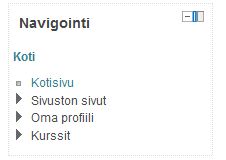
Uudessa versiossa navigointi toimii nuolia klikkaamalla, jolloin aukeaa lisävalintoja. Ensimmäisessä kuvassa navigointipalikka on perustilassa:
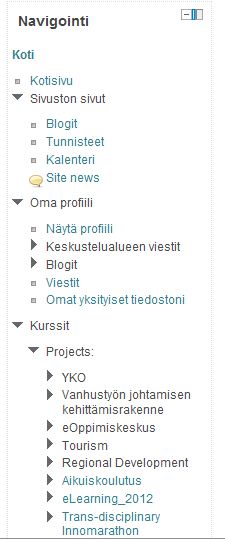
Nuolia tai mustia kolmioita, miten kukanenkin nämä symbolit mieltävät, auki klikkaamalla näkymä näyttää opettajan silmin vaikkapa tältä:
Jonkin aikaa uutta navigointia kokeilleena tuntuu tämä tapa helpolta ja järkeenkäyvältä tavalta kulkea Moodlessa 🙂
Kunhan päästään Moodle kakkosen toiminnoissa vielä eteenpäin, tulee vastaan todella elämää helpottavia toimia, kuten objektien siirto raahaamalla paikasta toiseen.
Jännittäviä aikoja edessä 🙂