Categories
eOppimispalvelut pedagoginen tekninen

Mitä kuuluu verkko-opintojen kehittämiselle vuonna 2016?

Lupasin jo ennen joulua kollegoille, että raapustan tänne pari riviä vuodelle 2016 asetetuista tavoitteista koskien verkko-opintojen kehittämisestä. Hieman viivähti tämä tänne kirjoittaminen, parempi kai kuitenkin myöhään kuin ei milloinkaan.

Lapin ammattikorkeakoululla on käynnissä mittava opetussuunnitelmatyö, OPS2017. Uusien opetussuunnitelmien lähtökohtana on osaamis- ja ongelmaperustainen oppiminen. Muita keskeisiä valintoja ovat yhteisopettajuus ja kehittävä arviointi. Arjen tasolla käytännössä OPSin toteuttamisen rungon muodostavat ”semesterikohtaiset” oppimisprojektit. Olemme siis ottamassa aikamoista tiikerin loikkaa pois sirpalemaisuudesta, opettajalähtöisyydestä ja yksin tekemisestä. Miten tämä sitten vaikuttaa verkko-opintojen kehittämiseen? Siten, että edellä kuvatut lähtökohdat ja toimintatavat on kyettävä toteuttamaan myös kokonaan verkossa. Me eOppimispalveluissa olemme mukana yhdessä osaamisalojen kanssa suunnittelemassa ja toteuttamassa mahdollisimman mielekkäitä tapoja toteuttaa semesteriprojekteja, oppijalähtöisiä menetelmiä ja kehittävää arviointia verkossa. Tässäpä haastetta meille kaikille!

Mitäpä muuta. Uuden OPSin toteuttaminen edellyttää henkilöstön osaamisen kehittämistä ja tarvelähtöisesti räätälöityjä opettajien koulutuksia toteutetaan eri koulutuksissa. Yhtenä uutena asiana on GoogleAppsforEducation (GAFE) –palvelun käyttöönotto ammattikorkeakoulussa. Tähän saakka palvelua on lähinnä pilotoitu YAMK-koulutuksissa. GAFE tuo tarpeellisia toiminnallisuuksia oppijalähtöisten menetelmien hyödyntämisen avuksi ja esimerkiksi käänteisen luokkahuoneopetuksen soveltamiseen.

Ei sovi myöskään unohtaa työtä, jota tullaan tekemään opintotoimistojen verkko-ohjausvalmiuksien ja opettajatuutoreiden verkko-ohjauskäytänteiden kehittämiseksi, labrojen virtualisoimiseksi ja opiskelijoiden käyttöön suunnatun mobiilisovelluksen loppuun saattamiseksi. Nämä ovat enemmän ja vähemmän vielä kaikki aluillaan.

Olipa kehittämiskohteita sitten 10 tai 20,  tekemistä ja haasteita riittää. Ollaanpa kuulolla näiden proggisten etenemisestä!

Categories
eOppimispalvelut Moodle tekninen

Ryhmäpalautus Moodletehtävässä edellyttää, että opiskelijat ovat ryhmissä!

The last few days the eLearning services have received several help requests from teachers who had created assignments in their Moodle courses and set Group submission to yes. However, they had omitted to create groups in the course and divide their students over those groups. The result is that Moodle considers all students in the course as one big group and that usually means only one of them can submit the assignment. On the assignment page it will look like this:

ryhmapalautus 1It also means that all students will see that one submission and can edit or delete it! To compound the problem, once a student has submitted in a group assignment, the setting cannot be changed anymore.

ryhmapalautus 2As indicated in the image above, the only quick solution in that case is to make a copy of the assignment and take away the group submission setting. The student(s) will then have to resubmit.

The longer solution is to go through the process of creating groups in the course (See instructions in Finnish or English) and perhaps combine those groups into a grouping (if there will be more group tasks in the course with different sets of groups). Divide the students over those groups either manually, or by allowing the students to choose their group themselves with the help of a Group Choice activity. Once all students are in their respective group, the Moodle assignment’s group submission will work properly.

Categories
eOppimispalvelut pedagoginen tekninen Verkko-oppimateriaalit

Henkilökunnan eOppimiskoulutukset / Staff Training in eLearning

Maanantaina 21/9 jatkamme verkko-opetusteeman parissa. Linkin iLinc-luokkaan ja muita ohjeita löydät täältä
https://docs.google.com/document/d/1e1u7ol_dUlSfSm6JpUVzATQ-piI-5rRQVkJrhe1zlNA/edit


eLearning in our organisation has grown from an exotic excursion for tech-savvy pioneers in education to a mainstream element in teaching at our University of Applied Sciences. From the beginning, the eLearning services have stressed that eLearning was not meant to replace face-to-face teaching but to augment it. Indeed eLearning made higher education accessible for many students who would otherwise not have been able to study. It also significantly reduced the amount of paper our teachers process in the course of an academic year. Furthermore, it has allowed a greater flexibility in time and place for both teachers and students. All these things are gains.

The downsides of eLearning should first and foremost when the opportunities offered by the paradigm are not properly exploited. Too many teachers still apply the traditional: text + assignment course set up, which in face of the opportunities offered by electronic learning, creates unnecessarily much work for the teacher. This effect is compounded by the pressure from school management to accept larger groups in on-line courses than traditional classrooms could hold. The latter makes sense from a financial point of view. However, I would like to stress, it goes against the advice of the experts!

Still, things being as they are and teachers always looking for ways to improve their teaching effort, it is highly recommendable to learn how to exploit the broad functionality of the on-line learning environments on offer to enrich, enliven and invigorate teaching and learning, while at the same time reduce the work strain put on the teacher where possible.

To this end, the eLearning Services in cooperation with the Heads of Education of Lapland UAS have set up a series of training sessions for teachers. Starting Monday 21.09.2015, these will encompass a variety of modern elements in education and match them with functionality in our learning environments. Participation is heartily recommended!

The link above gives access to the dates and topics of the training (in Finnish), as well as the iLinc classroom in which the training will be conducted.

Categories
eOppimiskeskus pedagoginen tekninen

Katsaus keväällä tehtyyn kehittämistyöhön

Mitä tapahtuikaan kevään aikana Lapin ammattikorkeakoulussa verkko-opetuksen saralla? Meni hetki ennen kuin asiat alkoivat palautua mieleen. Perustukityön, siis opettajien ja opiskelijoiden tukemisen ja kouluttamisen lisäksi tehtiin ainakin seuraavaa kehittämistyötä.

  • Pilotoitiin GAFEa (Google Apps for Education) YAMK-opinnoissa. Palauteraporttia ja yhteenvetoa tästä on tulossa elokuussa.
  • Tuettiin opettajia flipped classroom –ajattelun soveltamisessa, käytännössä mm. tehtiin tallenteita HangOuts on Air –sovelluksella. Ensimmäiset tällä tavalla toteutetut opintojaksot ovat toteutuksessa kesäopintoina.
  • Striimattiin ensimmäisiä kertoja YouTubeen seminaareja.
  • Laitettiin Optima ”pakettiin”, käyttö loppuu 30.6.2015.
  • Tehtiin opintojaksoja ”non-stop-tarjontaan” ja tuettiin näiden tuottamista. Homma on hyvällä alulla.
  • Valmistauduttiin Moodlen päivitykseen versioon 2.7.+. Päivitys tehdään 1.7. Työn alla viellä mm. integraatio O365-palveluun
  • Saatettiin loppuun KIRLAPPI-hanke. Hankkeessa tuotiin alueelle kirjasto- ja tietopalvelualan AMK-tutkintokoulutusta.  Hankkeen tuloksista voi lukea mm. näistä parista julkaisusta.
  • Laadittiin varsin kattava henkilöstön TVT-koulutussuunnitelma syksylle.
  • Oltiin tekemässä MTI:n kanssa Turvallisuusnormisto-palvelua/sivua.
  • Pohdiskeltiin UAS-lehdessä Pilvenhattaroista mielekkääseen oppimisprosessiin.
  • Ideoitiin opiskelijan henkilökohtaisen oppimisympäristön toteutusmallia. Tämä voi olla onnistuessaan iso juttu :).

Ja luultavasti tehtiin paljon muutakin, mitä en nyt vain muista. Tiimiläiset voivat kommentoiden lisätä tähän asioita. Elokuussa sitten lisää näistä ja syksyn muista jutuista.

Hyvää kesää ja lomaa!
Päivystävän tukihenkilön tiedot löydät osoitteesta eoppimispalvelut.fi

omenapuun_kukka

Categories
eOppimispalvelut Moodle Urkund

Spotlight on: Open Moodle

The eLearning Services of Lapland University of Applied Sciences do not only administer Lapinkampus Moodle, the main Moodle site for the UAS and associated schools in Lapland, like Ammattiopisto Lappia. There is a second Moodle site that is geared specifically towards international project work: Lapinkampus Open Moodle. The name refers to the site being open to email-based self-registration by users in the international projects that utilise the environment, whereas Lapinkampus Moodle only allows authentication via the user registration systems of Lapland UAS and Lappia AO, or via manual account creation by the eLearning Services. The latter is an obstacle to the smooth running of projects with outside users, who would depend on help to gain access to their project environments. The separate status of Open Moodle allows easy access.

Another advantage offered by Open Moodle is that as a smaller site, it can be used as a testing ground for upgrades and new functionality. Presently, Open Moodle is already running version 2.7.8+ to which Lapinkampus Moodle will be upgraded first by the end of the month. New features in this version of Moodle have been tested out already before they will be adopted in the main Lapinkampus Moodle site. These elements comprise the functionality of the new Atto text editor that was already announced in a previous post, but also a new mathematics filter and a new STACK question type that should allow the creation of very advanced mathematical quizzes. The upgrade to 2.7.8 will also entail improvements in existing functionality. For example, URKUND anti-plagiarism checking can now also be activated for a discussion forum, meaning that both the text of forum messages as well as attached files will be sent to URKUND for checking. Other improvements will concern greater ease of use for mobile users and improvements in marking and feedback in assignments, such as the option to annotate submitted PDF files in the browser.

The upgrade of Lapinkampus Moodle is scheduled for July 1st 2015.

Categories
iLinc Moodle

Mistä opiskelijat löytävät iLinc nauhoitteet

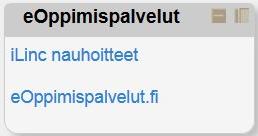
Opiskelijat löytävät iLinc nauhoitteet aina kyseisen kurssin Moodle ympäristöistä.

Tarkistathan, että ”eOppimispalvelut ” osio löytyy omasta kurssiympäristöstäsi ja ” iLinc nauhoiteet ” linkistä aukeaa oikean ryhmän nauhoitteet. Jos osio puuttuu tai linkki on väärä, niin laita sähköpostiviestiä eoppimispalvelut ( @ ) lapinamk.fi

1


Categories
Moodle Verkko-oppimateriaalit

Opettajien lisääminen moodle kurssiin

Voit lisätä toisia opettajia kurssiisi seuraavasti:

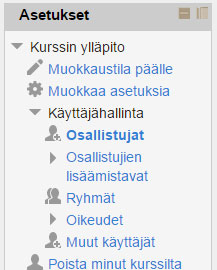
Avaa Asetukset valikosta Käyttäjähallinta ja sen alta kohta Osallistujat

1


Näytölle avautuu lista kurssisi osallistujista. Valitset tämän jälkeen kohta Lisää osallistujia (1.) joka avaa uuden ikkunan. Sieltä tulee aluksi valita kohta Jaa rooleja, josta valitaan Teacher (2.). Tämän jälkeen kirjoita hakukenttään opettajan sukunimi ja klikkaa Hae nappia (3.). Etsi tämän jälkeen nimilistalta opettaja ja klikkaa Lisää painiketta (4.). Jos haluat lisätä useamman opettajan, niin toista kohdat 3. ja 4. Lopuksi klikkaa vielä Lopeta osallistujien lisääminen (5.)

2


Categories
eOppimispalvelut Moodle

Future Prospects of Lapinkampus Moodle

The open source virtual learning environment Moodle in use at Lapland University of Applied Sciences is version 2.5 of the software. This version is no longer supported since the beginning of this year, so an upgrade is overdue. The reason why the eLearning Services decided not to upgrade during the Christmas break was that we did not want to confront the new Moodle users in Rovaniemi with too many changes in a short time frame. However, this summer, we will execute the upgrade of Lapinkampus Moodle over two branch versions to version 2.7. In this message we look forward to the differences you may expect.

First of all, the look and feel of the environment will change somewhat. Some of the old 1.9 course themes will no longer work with this version, because 2.7 requires themes to be adapted for mobile use. If you have enabled one of those old themes in your course, your course theme will be reset to the standard during the upgrade. On the other hand, several new themes will replace the obsolete ones, so that you have enough new and flexible options to choose from. Another noticeable change in appearance will be entailed by the adoption of the Atto editor as the default text editor in Moodle. This text editor is more flexible and accessible and will sport some new features like autosave.

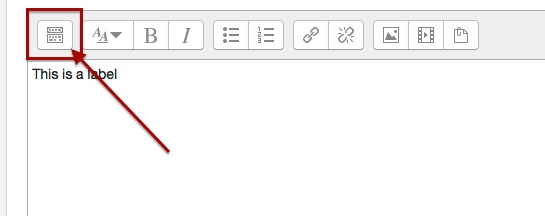
Atto editor expand menu
The button bar of the Atto editor will be collapsed (much like the editor in the WordPress blog) and can be expanded with the indicated button to show all functions.
Categories
eOppimispalvelut Moodle

Tyhjä kansio-ongelma? Empty folder issue?

KansionuoliEnglish: A small but annoying issue sometimes crops up with some users of the folder resource in Moodle. The folder seems empty of files, even though this is not the case. The solution is to click the tiny triangular icon to the left of the folder icon. This will unfold the contents of the folder. See the attached picture.

Suomeksi: Pieni mutta ärsyttävä ongelma joskus vaikutaa kansiotyökalu Moodlessa. Kansio näyttää tyhjää vaikka tämä ei ole totta. Ratkaisu on klikata pieni kolmiokuvaketta vasemmalla kansion kuvaketta. Tämä paljastuu kansion sisältöä. 

Categories
eOppimiskeskus iLinc

Meneekö iLinc luokassa näkymä sekaisin

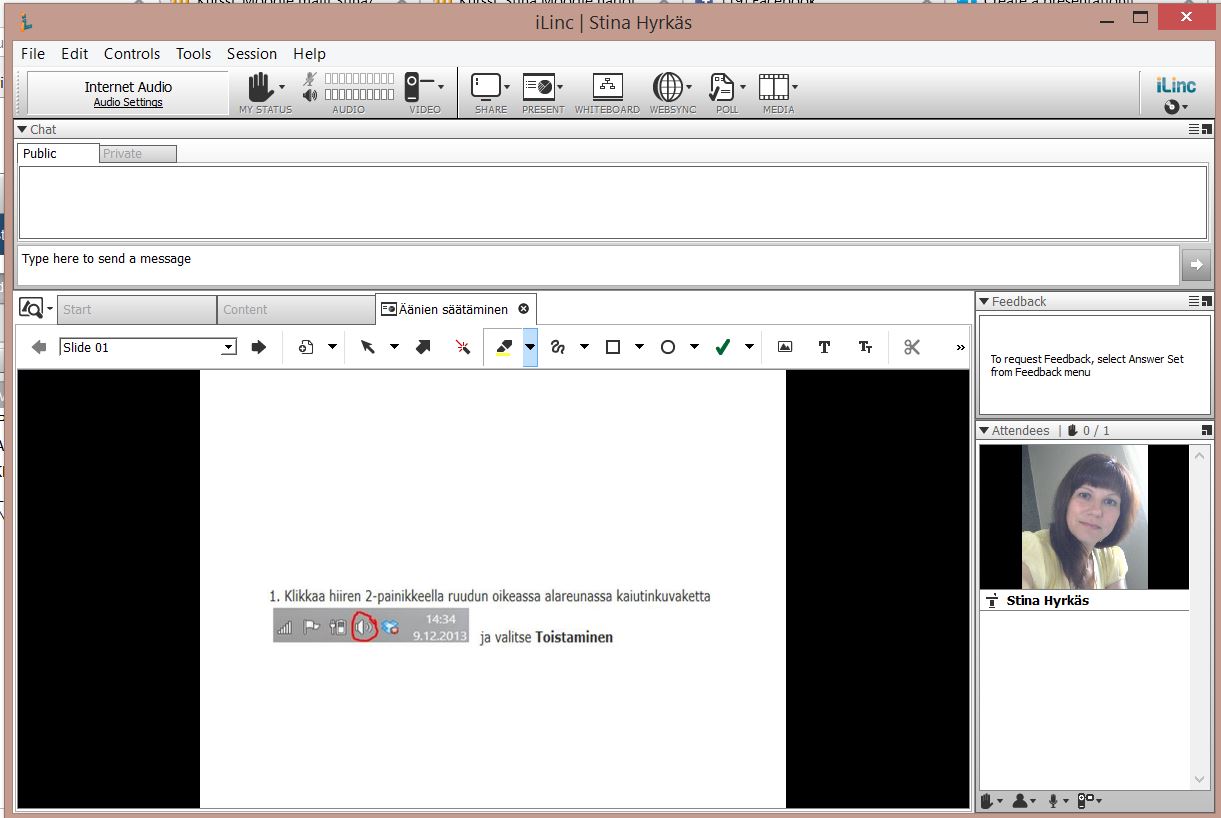
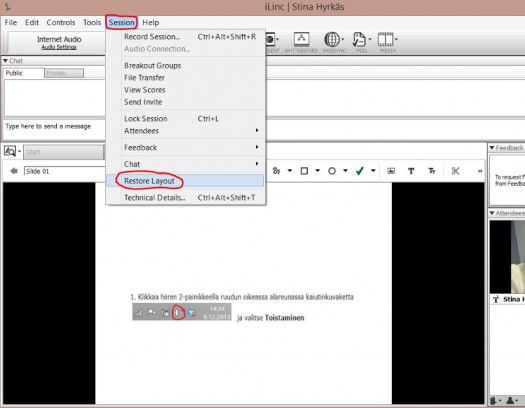
ILinc luokan osiot Attendees, chat ja Feedback ovat liikuteltavia elementtejä. Joskus näkymä voi mennä ihan vahingossakin sekaisin.

kuva2

 Ei hätää ! Näkymän voi nepeasti palauttaa ennalleen seuraavasti:
Session ylävalikko -> Restore Layout

i2