Olette jo ehkä huomanneet, että Moodle on muuttunut joululoman aikana. Uusi ulkoasu johtuu käyttöönotetusta uudesta teemasta. Jos teema ei miellytä silmää, niin opettajana voit vaihtaa sen mieleiseksesi asetuksissa.
Muutokset koskettavat vain opettajan roolissa toimivia, opiskelijoiden toiminnallisuuksiin ei ole tullut muutoksia. Tässäpä lyhyesti pääasialliset muutokset:
- Kompetenssien arviointi tuli mahdolliseksi. Ylläpito lisää kompetenssit Moodleen. Tällä hetkellä Moodlesta löytyy testausta varten LapinAMKin koulutusten yhteiset kompetenssit. Koulutuskohtaisia lisätään tarpeen mukaan.
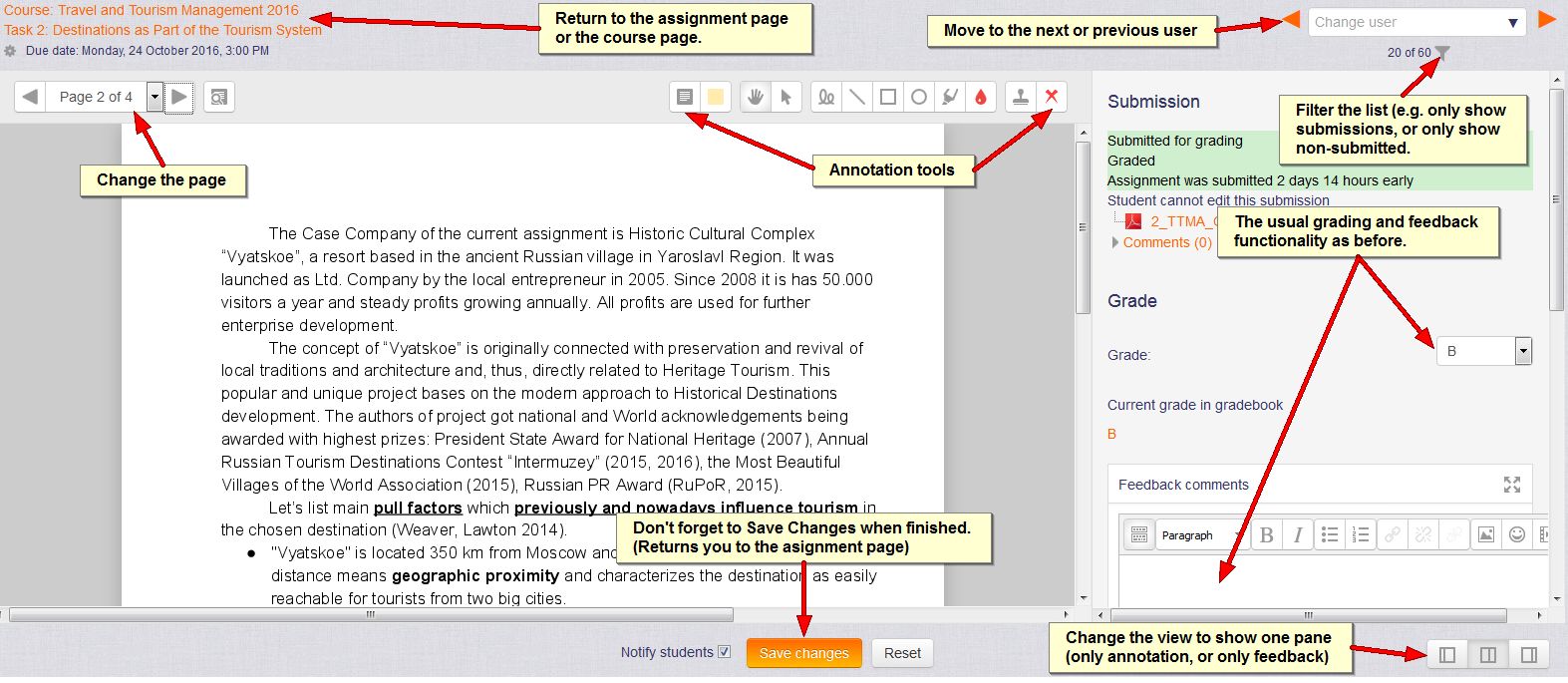
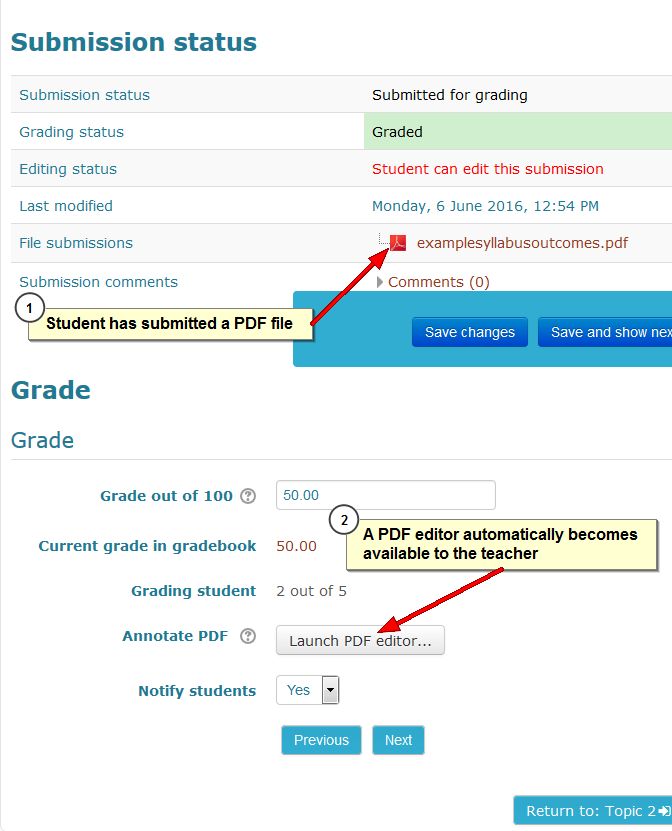
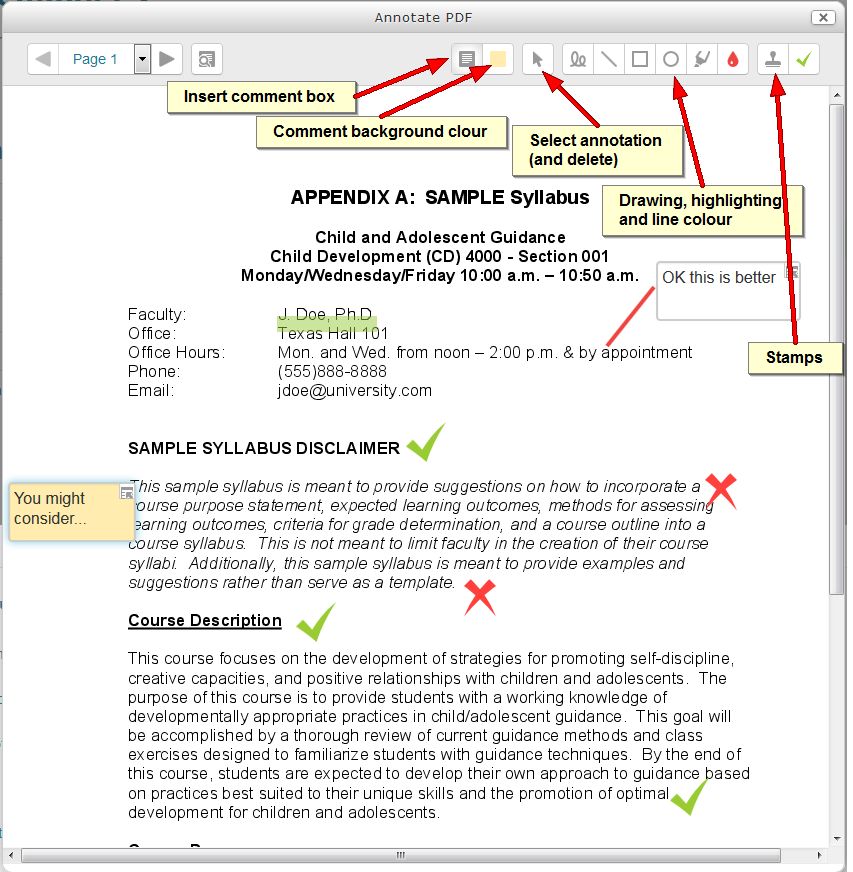
- Tehtävien arviointisivu on muuttunut siten, että oletuksena avautuu annotointi/kommentointi-ikkuna. Annotointi on mahdollista tällä hetkellä.pdf-tiedostoihin. Muutamien lähipäivinä tehtävien asennusten jälkeen myös .docx ja .odt –muotoisiin tiedostoihin.
- Tehtävätyökalusta opiskelijan palauttamista tiedostoista voi nyt valita haluamasi tiedostot omalle koneelle ladattavaksi (aiemmin vain yksi tai kaikki).
- Jos vahinko sattuu ja poistat tiedoston tai aktiviteetin, voit palauttaa sen roskakorista, joka näkyy Asetukset-lohkossa.
- Keskustelualueen viestiketjut voi kiinnittää keskustelualueen yläosaan ja viesteihin voi tehdä pysyvän linkin.
- Global search –toiminto mahdollistaa asiasanoilla sisältöjen etsimisen eri työtiloista (just nyt toiminto ei ole vielä käytössä LapinAMKin Moodlessa).
- Tageja on mahdollista lisätä blogien, työtilojen ja profiilien lisäksi nyt myös aktiviteetteihin ja aineistoihin.
- Joukko muita parannuksia navigointiin ja muokkaustoimintoihin.
Jos huomaat Moodlessa puutteita ja toimimattomia asioita tai haluat saada apua, niin ota yhteyttä eOppimispalveluihin eoppimispalvelut @ lapinamk.fi
And the same shortly in English:
As many of you may have already noticed, Lapinkampus Moodle and Open Moodle have changed a bit during the Christmas holiday. In addition to the default LapinAMK theme change the main changes are as follows:
- Competencies; Competency frameworks and learning plans can be set up by the administrators and enabled in courses by teachers and attached to activities. Teachers can rate students on competencies, separate from the grading of the activities. Presently, only the General Competencies at Lapland UAS have been added for testing purposes.
- Assignment grading; The grading page has changed and displays as default an annotation pane where files in .pdf, .docx and .odt format can be annotated. This does not work yet for the last two and teachers can hide the pane if they do not require it.
- Assignment download; File submissions can be selectively downloaded from the submission overview page.
- Recycle bin; Erroneously deleted activities or resources can now be restored from a recycle bin that appears in the Administration block.
- Forum discussion threads can be pinned to the top of the forum by the teacher and forum posts can be permalinked.
- Global search; A new search function allows users to search for keywords in all Moodle pages they have access to. (This has not yet been enabled on our sites.)
- Tags; In addition to Blogs, Courses and Profiles, tags can now also be added to activities and resources. Use with caution, so as to avoid a jungle of overlapping tags.
- Diverse minor improvements to make navigation and editing easier.
If you notice that something is wrong with Moodle, or you just need a little help, do not hesitate to contact the eLearning Services eoppimispalvelut @ lapinamk.fi