The school year has started and many teachers in the new Lapland University of Applied Sciences will be using Moodle for the first time, whereas others may need a refresher. A good opportunity therefore to list some simple but useful instructions:
1. Requesting a course in Moodle
Courses are made by the eLearning Services using different templates to create the right course for the student group (English or Finnish, Adult or Daytime students, etc.). To serve you best the eLearning Services need the following information, all of which can be found in SoleOPS:
- The name of the course
- The SoleOPS code for the course
- The name of the student group (or groups)
With these we can create the course and put it in the right category. You as teacher may also mention the names of additional teachers who need access to the course (although you can also add them yourself) and perhaps a starting date (important only if you use the “weekly” course format). You can also suggest an enrolment key, if you prefer to have your own rather than the key that the eLearning services will create.
2. Checking the enrolment key in your course
Sometimes, you may have forgotten the enrolment key to your course, or you may want to change it. In that case you can check it via the Course settings in the Administration block.
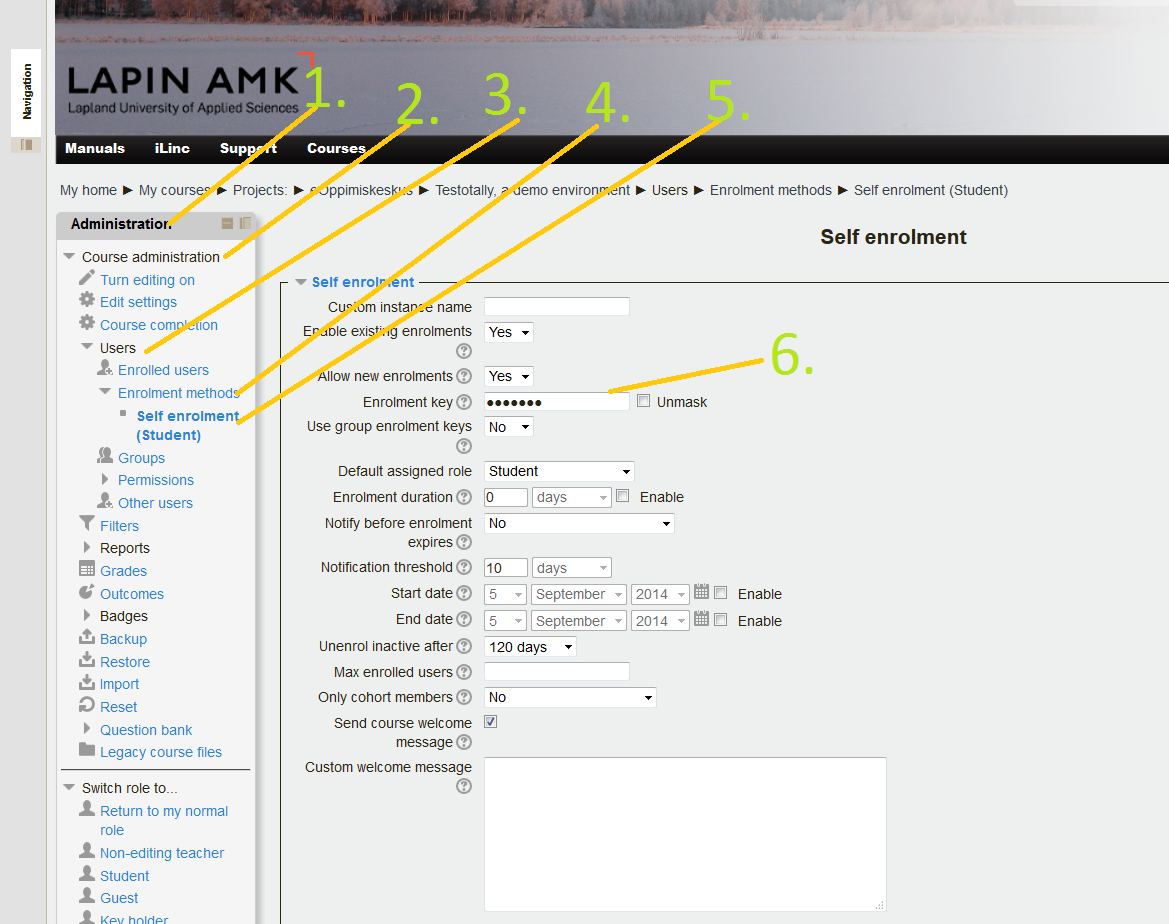
In the left column on the screen, in your Administration block-> press Course administration-> Users-> Enrollment methods-> Self enrolment -> now find the “Enrolment key” and unmask it to see your course enrolment key.
If you change the enrolment key, do not forget to Save changes!