Categories
eOppimispalvelut Moodle

Moodle 3 Features, part 1 Forum

The upgrade of Lapinkampus Moodle and Open Moodle to version 3 and up will not cause drastic shifts in the functionality of the environment, but will bring about a great number of incremental improvements. Some of these improvements and additional functionality will be highlighted in this and subsequent entries.

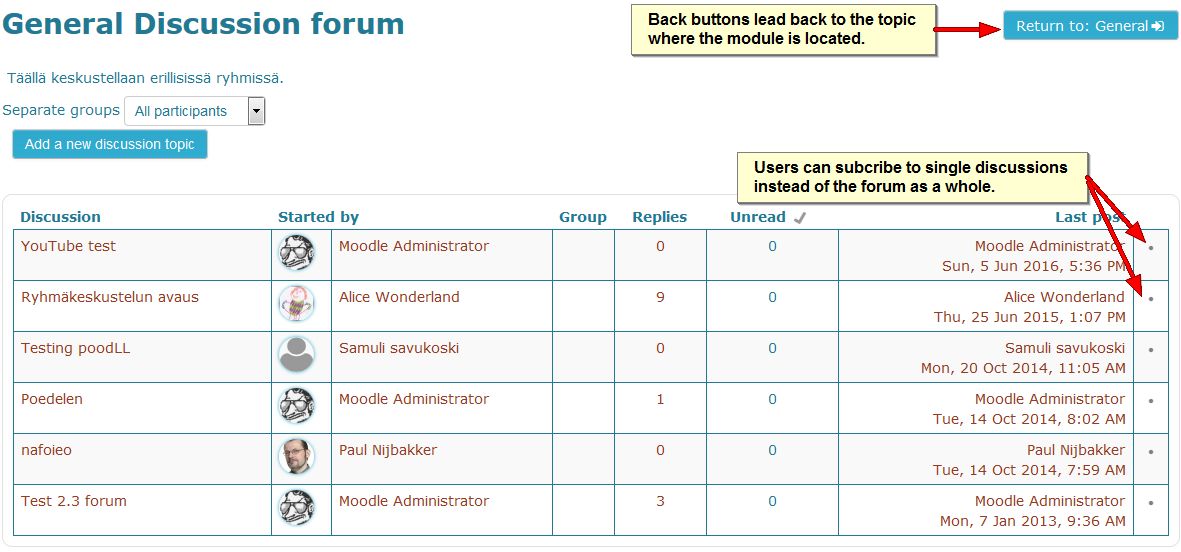
The Forum module in Moodle is the most used and most flexible tool that can perform almost all functions of the assignment module (including the Urkund plagiarism check), but combines it with the interactivity of a discussion tool. In the upgrade from Moodle version 2.7 to 3.0 the Forum will aquire a few improvements which are shown on the images below:

When writing a forum messages users in a group forum can decide to post their message in all the groups that they have access to.
When writing forum messages users in a group forum can decide to post their message in all the groups that they have access to.


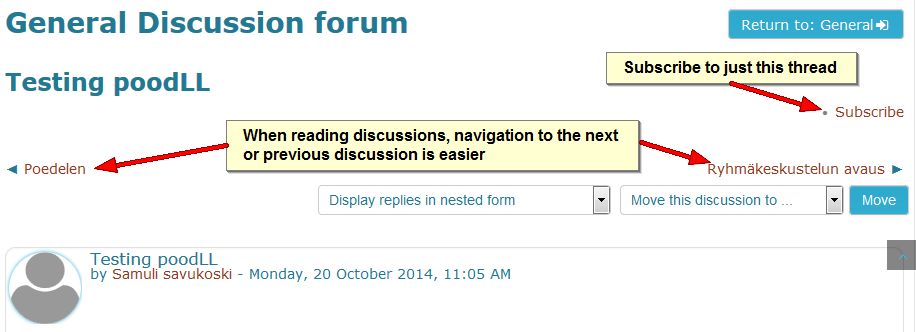
navigation between threads
In a forum it has become easier to navigate between discussion threads and it is now possible to subscribe to only one discussion.


Subscription to single threads
Subscription to single threads can also be done on the forum page. Also note that the back button now returns to the same topic you departed from.
Categories
eOppimiskeskus Moodle tekninen

Start the School Year in Moodle 2.3.

Users of the Moodle environments administered by the eLearning Centre of Kemi-Tornio University of Applied Sciences will this August discover that their familiar Moodle 1.9 has been upgraded no fewer than four branch versions to Moodle 2.3.1! This upgrade represents a major leap forward in functionality in Moodle, but inevitably it will also take some time getting used to the changes. New functionality in Moodle 2.3 (in addition to the features announced earlier, such as the Navigation and Settings blocks, conditional access and course completion and the file system with repositories and portfolios) comprises an all new assignment module that includes in one settings interface all the functionality of the four traditional assignment types. The Urkund anti-plagiarism service can be activated too from this settings page (The separate Urkund assignments have been deleted). Uploading files to Moodle has become easier in Moodle 2.3, because drag and drop uploading has been activated across the site (This works with all modern browsers, but not with Internet Explorer 9 or older).

The new drag and drop interface
The new drag and drop interface to upload files to Moodle. Note that traditional uploading via the File picker is still possible via the Add function.

Needless to say, an upgrade over four branches will entail the loss of certain contributed functionality that existed in Moodle 1.9. The Urkund assignment module is gone, as announced above. The obsolete Journal module too was left behind. The eMail-list block is another element that has not been updated for use in Moodle 2.3 yet and, hence, will be missing from the site. Of other modules certain instances that were corrupted in one way or another, have been deleted from Moodle and the Moodle database. In other words, teachers in Lappia and Lapin verkkokoulu Moodle should check their courses carefully and be prepared to make repairs or modifications.

The eLearning Centre is as always at your service to answer any questions you might have and to offer hands on help and training where needed.

Categories
Moodle pedagoginen tekninen

Oppimistehtävät suoraan Moodlesta Urkundiin tarkistettavaksi

Read this entry in English

Kemi-Tornion ammattikorkeakoulussa on otettu käyttöön Urkund -plagioinninesto-ohjelma, joka tarkistaa automaattisesti siihen sähköpostilla lähetetyt dokumentit Internetistä kopioitujen tekstien varalta. Se vertaa tekstiä myös omasta tietokannastaan aiemmin tarkistetuista dokumenteista.

Urkundia voi käyttää henkilökohtaisen Urkund-tilin kautta, joka on sidottu tiettyyn sähköpostiosoitteeseen. Dokumentit voidaan lähettää yhteen Urkund-sähköpostiosoitteeseen liitetiedostoina tarkistamista varten. Henkilökunta voi tiedustella Kaisa Vesamäeltä Urkund-tiliä.
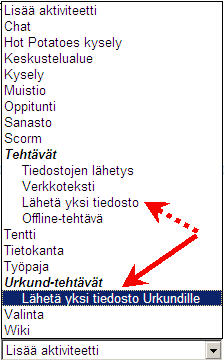
Lisää Urkund-tehtävä aktiviteettivalikostaHelpoin tapa käyttää Urkundia on Moodlen kautta. Voit opettajan roolissa asettaa Moodlessa oppimistehtävän tyypiksi Urkund-tehtävän, joka eroaa “tavallisesta” oppimistehtävästä vain siinä, että Moodle lähettää tehtävän Urkundiin tarkistettavaksi ja palautettavaksi 24 tunnin sisällä. Voit avata tulosanalyysin tehtävänpalautuksen arviointisivulta ilman, että sinun tarvitsee erikseen käyttää Urkund-tiliä. Arviointi ja kommentointi tapahtuvat myös kuten Moodlessa normaalistikin.

Jos haluat lisätä Urkund-tehtävänpalautuksen Moodle-kurssillesi, tästä linkistä pääset Moodlen ohjeisiin (http://moodle.tokem.fi/mod/book/view.php?id=51005&chapterid=17034). Jos haluat lisätietoja, ota yhteys eOppimiskeskukseen.

On suositeltavaa, että opiskelijoille kerrotaan Urkundin käytöstä ja havaittujen rikkeiden seurauksista. Plagioinnin esto on kuitenkin tehokkaampaa kuin rangaistukset.

Categories
Moodle pedagoginen tekninen

Urkund Moodle assignment available

Lue tämä viesti suomeksi

Kemi-Tornio University of Applied Sciences has adopted the Urkund anti-plagiarism service to be used by its teachers in the struggle against copy and paste fraud committed by students. Urkund is an online service that checks documents sent to it via email in an automated process for text strings copied from Internet resources. It also compares text with its own database of previously checked documents.

A teacher wishing to use Urkund needs an Urkund account which is tied to a special email address. Documents can be sent as single email attachments to this Urkund email address for processing. If you are a staff member and do not yet possess an Urkund account, you can request one from Kaisa Vesämäki.

Adding an Urkund assignment from the Activities menuBy far the easiest way to use Urkund is via the Moodle integration that is available now. The Urkund assignment will see students hand in documents just as in a normal Moodle assignment, but with the difference that the documents will be sent from Moodle to Urkund for processing and that Urkund will send back the result of the analysis to the assignment in Moodle within 24 hours. The teacher can open the analysis report from the assignment’s grade page without needing to access Urkund separately. Grading and commenting is done as in any other Moodle assignment.

If you wish to add an Urkund assignment to your course, there is a page in the Moodle manual to help you (http://moodle.tokem.fi/mod/book/view.php?id=51005&chapterid=17021). If you need more help than the manual can offer, you can always contact us at the eLearning Centre.

It is advisable to inform the students about Urkund and the repercussions they would face should they be caught committing fraud. After all, prevention of plagiarism is far more efficient than prosecution of the culprits.