Categories
eOppimispalvelut Lappia Blog Moodle tekninen Verkko-oppimateriaalit

Coming soon: H5P Learning Content Tool

The eLearning Service of Lapland University of Applied Sciences has over the past few weeks been checking out a relatively new Moodle plugin: H5P Interactive Content.

H5P is a web service that was developed in Tromsø in 2013 for a Norwegian provider of learning content. The service has since been released as open source software and its functions can be used via a Moodle plugin. In the version being tested presently, a teacher can choose to create interactive content such as Interactive Videos, Question Sets, Drag and Drop Questions, Multi-Choice Questions, Presentations and much more. There are 28 different types at the moment of writing, including an option to use the Appear.in web conferencing service (introduced on the ePakki blog!) as a chat room in your course. All materials are in HTML5 and thus have great usability (also on mobile devices). You can read more about it here: https://h5p.org/documentation/for-authors. In addition to being an authoring tool for rich content, H5P also enables teachers to import and export H5P files for effective reuse and sharing of content.

The eLearning Services consider that, since the amount of different content types on offer is quite big (and each content type has many options), the plugin may pose challenges to teachers. However, with support from us, quite varied and useful material can be created with H5P. We encourage teachers to partake of the possibilities offered and contact the eLearning Services when they have settled on interactive material that they want to create using H5P. Teachers could start by making existing material more interactive. For example, if you have a YouTube video that you use in your course (i.e. one that allows such use, maybe with a creative commons license), you can now consider turning that video into an activity containing labels and questions pertaining to the content of the video! (Click on the pic to see a bigger version.)
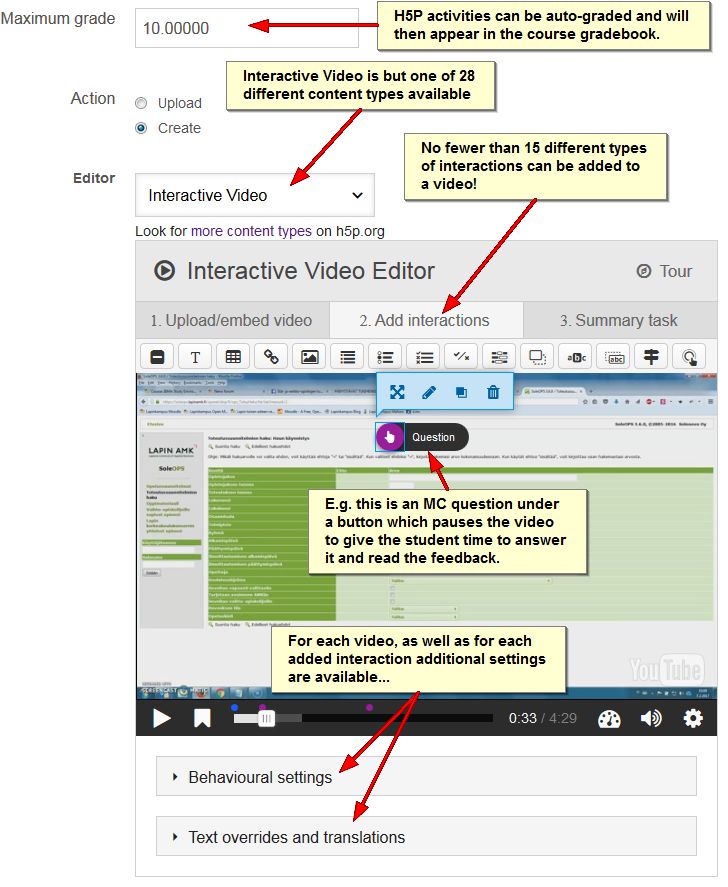
A detail of the creation of an inteactive video using the H5P Moodle plugin. The wealth of options demonstrates the need for support for beginning users.

The H5P plugin will be installed in Lapinkampus Moodle and Open Moodle before Easter. You will then find it in the list of activities presented in the “Add and activity or resource” pop up in your Moodle course(s).

Note that there is even an H5P plugin available for Lapinkampus Blog! You can open the video below in full screen if you want.
Categories
eOppimispalvelut pedagoginen tekninen Verkko-oppimateriaalit

Henkilökunnan eOppimiskoulutukset / Staff Training in eLearning

Maanantaina 21/9 jatkamme verkko-opetusteeman parissa. Linkin iLinc-luokkaan ja muita ohjeita löydät täältä
https://docs.google.com/document/d/1e1u7ol_dUlSfSm6JpUVzATQ-piI-5rRQVkJrhe1zlNA/edit


eLearning in our organisation has grown from an exotic excursion for tech-savvy pioneers in education to a mainstream element in teaching at our University of Applied Sciences. From the beginning, the eLearning services have stressed that eLearning was not meant to replace face-to-face teaching but to augment it. Indeed eLearning made higher education accessible for many students who would otherwise not have been able to study. It also significantly reduced the amount of paper our teachers process in the course of an academic year. Furthermore, it has allowed a greater flexibility in time and place for both teachers and students. All these things are gains.

The downsides of eLearning should first and foremost when the opportunities offered by the paradigm are not properly exploited. Too many teachers still apply the traditional: text + assignment course set up, which in face of the opportunities offered by electronic learning, creates unnecessarily much work for the teacher. This effect is compounded by the pressure from school management to accept larger groups in on-line courses than traditional classrooms could hold. The latter makes sense from a financial point of view. However, I would like to stress, it goes against the advice of the experts!

Still, things being as they are and teachers always looking for ways to improve their teaching effort, it is highly recommendable to learn how to exploit the broad functionality of the on-line learning environments on offer to enrich, enliven and invigorate teaching and learning, while at the same time reduce the work strain put on the teacher where possible.

To this end, the eLearning Services in cooperation with the Heads of Education of Lapland UAS have set up a series of training sessions for teachers. Starting Monday 21.09.2015, these will encompass a variety of modern elements in education and match them with functionality in our learning environments. Participation is heartily recommended!

The link above gives access to the dates and topics of the training (in Finnish), as well as the iLinc classroom in which the training will be conducted.

Categories
Moodle Verkko-oppimateriaalit

Opettajien lisääminen moodle kurssiin

Voit lisätä toisia opettajia kurssiisi seuraavasti:

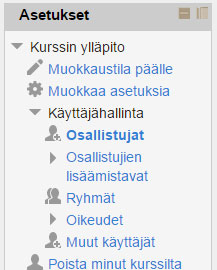
Avaa Asetukset valikosta Käyttäjähallinta ja sen alta kohta Osallistujat

1


Näytölle avautuu lista kurssisi osallistujista. Valitset tämän jälkeen kohta Lisää osallistujia (1.) joka avaa uuden ikkunan. Sieltä tulee aluksi valita kohta Jaa rooleja, josta valitaan Teacher (2.). Tämän jälkeen kirjoita hakukenttään opettajan sukunimi ja klikkaa Hae nappia (3.). Etsi tämän jälkeen nimilistalta opettaja ja klikkaa Lisää painiketta (4.). Jos haluat lisätä useamman opettajan, niin toista kohdat 3. ja 4. Lopuksi klikkaa vielä Lopeta osallistujien lisääminen (5.)

2


Categories
Optima tekninen Verkko-oppimateriaalit

Optima työtilojen pakkaaminen ja tallentaminen omalle koneelle

Seuraavalla videolla näytetään, että miten saat tallennettua omalle koneellesi optimassa olevan materiaalin, jotta voi esimerkiksi uusio käyttää sitä moodle ympäristössä.

http://www.youtube.com/watch?v=DRxm-WfARzs&feature=youtu.be

Categories
eOppimiskeskus Muut pedagoginen Verkko-oppimateriaalit

Jaan asiantuntijuutta, onko se minulta pois?

Sain juuri sähköpostia. Slideshare ilmoitti minulle, että palveluun lataamiani diaesityksiä oli katseltu n. 7000 kertaa. Se pistää miettimään, että olenko kerrankin osannut tehdä jotakin kiinnostavaa 🙂 Totuus on, että toinen esityksistä liittyy työympäristöni tärkeisiin välineisiin ja on siksi pääasiallisesti minun työtä jakaakin sitä asiantuntijuutta. Tätä esitystä on linkitetty iLincin kirjautumissivun kautta ja esitystä on ladattu reilussa 2 vuodessa n. 4500 kertaa.

Enemmän ihmettelin toisen esityksen kiinnostavuutta, koska emme ole sitä linkittäneet mistään yleisemmältä sivulta. Miten ihmeessä sitä

Categories
iLinc pedagoginen Verkko-oppimateriaalit

Flipped Classroom iLincissä

Oletko tottunut yksisuuntaiseen luennointiin iLincissä? Toivoisitko opiskelijoilta aktiivisempaa osallistumista luennoille? On monia tapoja rakentaa opiskelijoita aktivoivia ja osallistavia iLinc-luentoja. Yksi niistä on ns. flipped classroom.

Flipped classroomin idea on päinvastainen perinteiselle toiminnalle. Se, mikä perinteisesti on kotityötä, tehdään luennon aikana, ja mikä perinteisesti on ollut opetusta, tehdään kotityönä. Voit esimerkiksi tehdä luentomateriaalin valmiiksi etukäteen, ja jakaa sen Optimassa. Opiskelijoiden kotitehtävänä voit pyytää heitä tutustumaan tähän luentomateriaaliin tai antaa orientoivia tehtäviä. Luentomateriaalihan voi olla mitä tahansa aiheeseen liittyvää: PowerPoint-kalvoja, videoita tai esimerkiksi artikkeleja aiheesta. Luentomateriaalia voi käyttää myös PBL:n ”triggerin” tavoin. Ja muistathan, kaikkea materiaalia ei suinkaan tarvitse tehdä itse! iLinc-luennoille varatun ajan voit vastaavasti käyttää yhteiseen keskusteluun aiheesta joko koko luokan kesken tai pienryhmissä. Tällöin opiskelijat pääsevät aktiivisemmin ottamaan osaa opetukseen. He voivat keskustella, esittää ideoita, kysymyksiä ja sitä kautta kehittää ajatteluaan.

Flipped classroom on helppo toteuttaa iLincissä. Se aktivoi opiskelijoita ja rohkaisee heitä keskusteluun. Opettajakin pääsee luennoitsijan roolistaan hetkeksi eroon ja toimimaan opiskelijoita ja heidän oppimistaan ohjaavana toimijana.

/Kristiina

Categories
eOppimiskeskus iLinc Lappia Blog Lappia Wiki Mahara Moodle Verkko-oppimateriaalit

Summer Upgrade Timetables and what to expect

Dear readers of the Viikon e-vinkki blog, the summer of 2012 will see upgrades of practically all learning environments administered by the eLearning Centre of Kemi-Tornio University of Applied Sciences. The eLearning Centre will do its utmost to limit possible inconvenience for useres, but all who will be using the environments should be prepared for temporary interruptions in service.

Moodle

The Linux operating system of the Moodle server, which runs Lappia Moodle, Lapin verkkokoulu Moodle and Lappia Open Moodle will be renewed in the Month of June (9 and 10 June to be exact). Any interruptions in service will affect all three Moodle installations and the Mahara installations networked with two of them.

After testing the new operating system, Lappia Moodle and Lapin verkkokoulu Moodle will be upgraded from version 1.9.+ to version 2.2.+ (or even straight to version 2.3.+) at the end of June (18 and 19 June to be exact). The move to Moodle 2 has been announced in several earlier articles in this blog (here, here, here, here and here). It will be the largest stride in terms of new functionality so far in the development of Moodle and all users should prepare themselves for it as best they can. One way to familiarise yourselves with Moodle 2 is to create an account in Lappia Open Moodle, which has been in version Moodle 2.2.+ since the beginning of this year.

The upgrade of the Moodle installations will be preceded by a rigorous clean-up operation. All courses that are without teachers will be permanently deleted! If you have lost access to some of your courses, it is very important to contact the eLearning Centre with the full title of your course(s) so that you can be returned to your course(s) before they are deleted. A circular message about this will follow (in Finnish). In addition to removing empty courses, all inactive users will be deleted from the database. If you have not been active in Moodle during the past year, you may want to log in to avoid being deleted!

The Moodle 2 upgrade may affect learning matter that you have in your courses. in certain cases links may be broken and will have to be restored. It would be therefore advisable to check your course materials in Moodle well in advance of the start of the autumn semester to ensure all works as it should. The help of the eLearning Centre can be enlisted if problems have occurred after the upgrade.

Summing up, all staff who use Moodle should prepare for the coming upgrade, to minimise the risk of surprises. Those who have planned using Moodle in summer education during the month of June should be prepared for interruptions in service and, where possible schedule their teaching around them. The exact dates and times for the upgrades will be announced among other places on the page www.etukipalvelut.fi.

Mahara

The e-portfolio Mahara will be even more closely integrated with Moodle during the summer. When Moodle will be upgraded to version 2.3.+ Mahara will be upgraded to version 1.5.+ . We estimate this will be in the beginning of July. At this point two-way uploading and downloading between the environments should be possible, making Mahara a true repository for all course work carried out in Moodle and making Mahara for alumni a reality.

iLinc

iLinc is due to be upgraded to version 11 during the summer of 2012. A new server will be installed for the purpose. iLinc 11 will feature an adapted interface, improved audio codec and, not in the last place, an integration with Moodle, so that users can acces iLinc directly from their Moodle courses.

Wiki and Blog

Finally, Lappia Wiki and Lappia Blog are also likely to be upgraded during the summer, July being the scheduled month, but these upgrades should not entail serious changes in functionality or any lengthy interruptions in service.

And finally

The whole system of usernames and passwords at the Lappia consortium will be overhauled during the month of July as part of the integration of the theLappia computer network into the LUC network with the networks of Lapland University and Rovaniemi UAS. This operation, which is carried out by the IT services of Lappia, will also entail interruptions in the accessibility of the learning environments administered by the eLearning Centre. These interruptions will also be announced in advance.

Categories
Optima pedagoginen tekninen Verkko-oppimateriaalit

Tuuleta Optimaasi!

Lukuvuoden hiljalleen päättyessä on hyvä tuulettaa Optimaa ja valmistautua näin tulevaan syksyyn. Jokaisen opettajan olisi suositeltavaa tehdä katsaus  aktiivisiin Optima-työtiloihinsa. Tilastojen mukaan yksittäisten opettajien työtilojen lukumäärä RAMK:ssa vaihtelee 1-50:een. Ovatko kaikki työtilat ylipäänsä tarpeen?

Työtilan omistajana voit joko poistaa tai arkistoida työtilan.  Suositeltavaa on myös käyttää Optiman materiaalivarasto-työtiloja.  Voit siirtää opetusmateriaaliasi varastoon ja linkittää näitä myöhemmin haluamiisi työtiloihin Optimassa.  Nyt kaikki tuulettamaan!

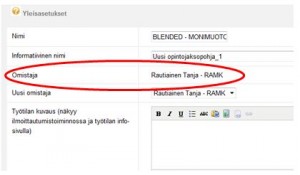
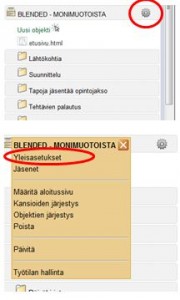
Tarkista aluksi työtilan päätasolta ratas -kuvakkeen alta Yleisasetuksista, että olet työtilan omistaja. Älä tee alla olevia toimenpiteitä työtilalle mikäli et ole työtilan omistaja. Huomioi myös, että jos työtilassa on useampi opettaja (supervisor-oikeudet) on tärkeää sopia yhdessä työtilaa koskevista toimenpiteistä.


Työtilan poisto

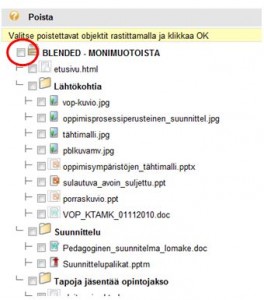
Mikäli haluat kokonaan poistaa tarpeettoman työtilan, onnistuu se valitsemalla ratas -kuvakkeen alta löytyvästä valikosta ”Poista”. Valitse tämän jälkeen työtilan nimen kohdalla rastittamalla kaikki objektit poistettaviksi ja hyväksy valinta klikkamalla Ok. Optima varmistaa vielä, että olet todella poistamassa koko työtilan ja sen kaikki objektit. Hyväksy tämä rastittamalla Poista. Työtila siirtyi Optiman roskakoriin josta se järjestelmän ylläpidon toimesta poistetaan.


Työtilan arkistointi

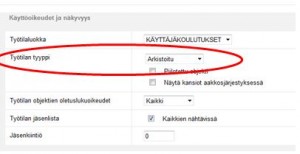
Valitse työtilan päätasolta ratas -kuvakkeen alta Yleisasetukset. Valitse tämän jälkeen kohdasta  Käyttöoikeudet ja näkyvyys – Työtilan tyyppi alasvetovalikosta ”Arkistoitu” ja hyväksy valinta klikkaamalla Ok.


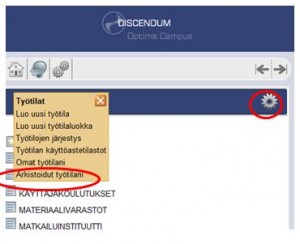
Työtila siirtyy henkilökohtaiseen arkistoosi. Työtila ei näy tämän jälkeen sen jäsenille.  Löydät arkistoidut työtilasi Optimasta valitsemalla kohdasta Työtilat  ratas -kuvakkeen alta Arkistoidut työtilani. Voit palauttaa työtilan jälleen käyttöön vaihtamalla sen yleisasetuksista työtilan tyypiksi alasvetovalikolla ”Vakiotyötila”.

Usein vanhoja työtiloja pidetään auki koko opiskelijaryhmälle muutamia rästisuorituksia varten, mikä ei ole suositeltavaa. Arkistoimalla työtilan se ei ole tarpeettomasti auki niillä jotka ovat suorituksen jo tehneet. Rästisuorittajille työtilaa voidaan palauttaa arkistosta käyttöön tarpeen mukaan.

Työtilan poiston ja arkistoinnin lisäksi kannattaa miettiä, voisiko vanhan työtilan päivittää seuraavalle opiskelijaryhmälle käyttöön uuden työtilan avaamisen sijaan?

Lisätietoja: optimatuki@ramk.fi

Tanja Rautiainen

Categories
eOppimiskeskus pedagoginen Verkko-oppimateriaalit

The WHY of eLearning

At Kemi-Tornio University of Applied Sciences all study programmes contain a certain degree of online work for students and teachers, from a mere support environment for classroom courses to full-time eLearning. Pretty much all students and teachers (96%) are thus affected by this learning paradigm. Some are trained specifically for the purpose of online studying and other merely suffer it as they go along, but few ever wonder WHY we employ eLearning in all degree programmes, even for our fulltime day students.

So, why do we offer online education in one form or another to all our students? Why does the Finnish government encourage eLearning in all secondary and tertiary education?

Naturally, our adult students are best placed to provide answers to those questions. Most students in fully online study programmes cannot afford to study in traditional face to face settings due to time constrictions, or other obstacles such as remote location, full-time employment, physical handicaps, or the care of infants or elderly family members. However, while indicative, this is not the whole answer. It does not explain why we have our daytime students study in Moodle and Mahara in addition to their contact classes. Hence, we have to take a broad perspective to see the relevance of eLearning to all students.

We have to consider that within one lifetime the world we live in has moved from hand-written letters to email and SMS, from rotary dial telephones to smart phones and VOIP, from movable type printing presses to faxes and laser printers, from mechanic typewriters to word processors and spell checkers, from card catalogues to electronic databases and cloud computing, from plain old copper cables to fibreglass and wireless networks, the list goes on and on. The electronic revolution has affected our society profoundly, especially in the way we handle information. Developments in economy and technology have consequently sped up, leading to the need for and development of such concepts as information society and lifelong learning.

Now consider that Finland is a small country with a high standard of living. To compete with the world at large, a country like Finland needs to remain ahead of its competitors in terms of hi-tech and the ability of its work force to deal with technology, to adapt to constant change, to educate themselves further even before the need arises and, furthermore, to do so while remaining active participants in working life. Such a country needs an education system that not only provides this continuing education, but that also enables its students to partake of it.

A good school prepares its students for working life. In a modern, globalised, information society that means that the students have to be taught the skills to navigate the digital information ocean, to retrieve, evaluate and process data, to communicate these data via electronic channels and, moreover, to do so while holding down a full-time job in any location in the world. This is where the eLearning effort at Kemi-Tornio University of Applied Sciences comes in. This is why teachers and students engage with virtual learning environments, social media and virtual classrooms as part and parcel of their studies. This is what the eLearning Centre of Kemi-Tornio UAS supports and develops and it is an area in which we lead the way for many other schools in Finland and abroad.

Categories
Moodle Verkko-oppimateriaalit

Moodle opetuksen tueksi

Syksy on lähtenyt rytinällä käyntiin ja uudet opiskelijaryhmät aloittaneet opintonsa. Nyt jos koskaan on hyvä aika ottaa Moodle opetuksen tueksi, jotta voit helpottaa työtaakkaasi 🙂

Kun opetusmateriaali ja tehtävät ovat Moodlessa, sinun ei tarvitse seistä kopiokoneen ääressä kopioimassa opiskelijoille materiaaleja. Opiskelijoiden reput pysyvät samalla kevyenä, kun tarvittava aineisto on näppärästi Moodlesta saatavilla. Opiskelijat voivat itse valita, mitä he haluavat tulostaa. Opiskelijoiden tehtävät pysyvät myös nätisti arkistoituna, kun he palauttavat ne Moodlen syövereihin. Me eOppimiskeskuksessa autamme mieluusti Moodlen käyttöönotossa ja huolehdimme opiskelijoiden Moodle-perehdytykset.