Some teachers, when trying to check the enrolment key in their course, or to set a new key, discover to their dismay that the box of the enrolment key displays their Moodle password!
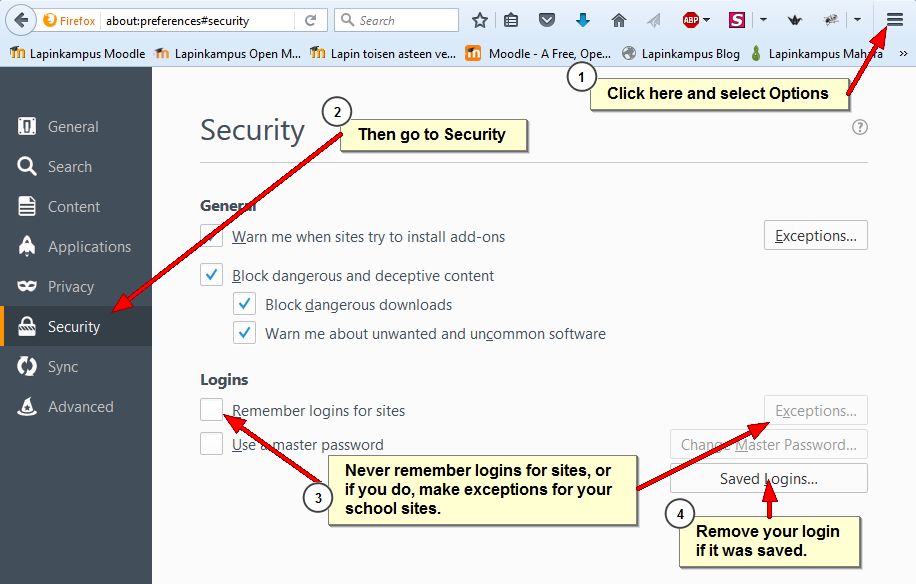
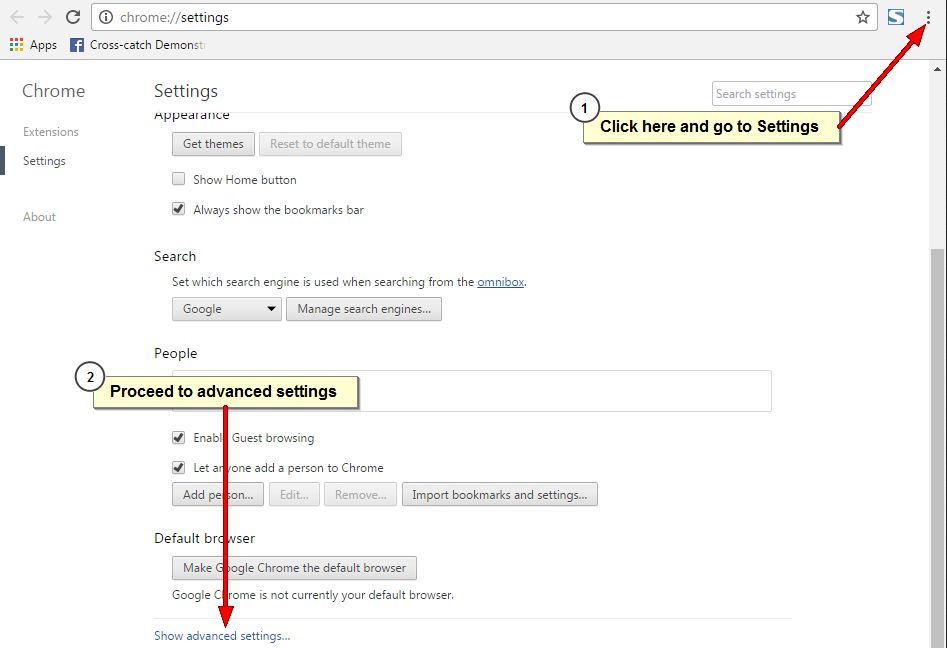
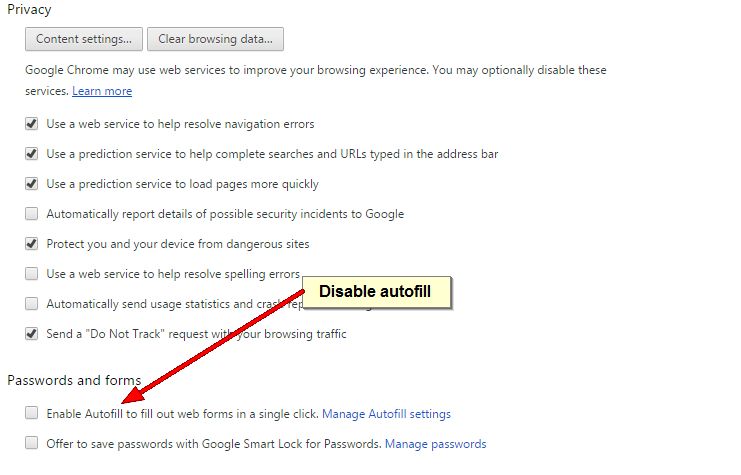
This effect is caused by the autofill or autocomplete function of the browser that they are using. Autofill is a functionality in modern browsers that allows users to store their log in information in the browser. It makes it easy to log in to sites, because you do not have to remember your username or password, the browser fills them in automatically. However, this poses a security risk and Moodle users, especially teachers, should never allow their browser to remember their username and password, especially those who log in with their school network account that also gives access to all other school services!
Here are instructions on how to turn off autocomplete in the recommended browsers Firefox and Chrome.
Moodle-oppimisalusta lähettää ilmoituksia ja erilaisia viestejä käyttäjien sähköpostiin, esim. tehtäväilmoituksia ja kopioita keskusteluviesteistä (sillä edellytyksellä että olet tilannut keskusteluviestit). Ongelmana on se, että kaikki sähköpostijärjestelmät eivät käsittele Moodle-viestejä samalla tavalla. Jotta Moodlen lähettämät viestit kulkisivat paremmin, eOppimispalveluissa on päätetty asettaa kaikkien LUC- ja Lappia– käyttäjien sähköpostiosoitteeksi oppilaitoksen sähköposti (käyttäjät voivat asettaa vaihtoehtoisen, henkilökohtaisemman sähköpostiosoitteen Viestit-asetuksissa. Ohjevideo: https://youtu.be/g8atSwecIEQ). Lisäksi 29. marraskuuta kaikki Moodlen lähettämät sähköpostit tulevat osoitteesta noreply@moodle.eoppimispalvelut.fi. Tämän pitäisi parantaa Moodle-viestien vastaanottamista ulkoisiin sähköpostijärjestelmiin, mutta se tekee mahdottomaksi Moodle-viesteihin vastaamisen oman sähköpostin kautta. Jos sinulla on halua/tarvetta vastata Moodle-viestiin, sinun täytyy tehdä se Moodlen kautta. Noreply-muutos on auttomaattisesti, et tarvitse tehdä mitään
——————————————————
The Moodle learning environment sends out notifications and diverse messages to the email of the users, examples are assignment notifications and copies of forum messages (provided you are subscribed to the discussion forum or thread in question). The problem is that not all email inboxes in use will treat the messages from Moodle equally. To improve the proper delivery of messages sent out by Moodle, the eLearning Services have decided to set the email of all LUC and Lappia-authenticated users to their school email (although users can opt to set an alternative email address in their Messaging settings. Instruction video: https://youtu.be/g8atSwecIEQ). Furthermore, as of 29 November, all outgoing email from Moodle will have noreply@moodle.eoppimispalvelut.fi as sender. This should improve acceptance of Moodle messages by external email inboxes, but it will make it impossible to reply to Moodle messages via your email, i.e. if you want/need to reply to a message from Moodle, you will have to go to Moodle to do so. The noreply change will be automatic, so you do not have to do anything.
In Moodle 2 the user menu could be accessd via the Administration block under the link “My profile settings”. In Moodle 3 the user menu has moved to the navigation bar, from where it can be opened and used as shown in the image below with instructions for changing the password (NB: Only users with manual accounts can change their password, if you use your school network account, the password can only be changed in the school network!).
HOWEVER, this functionality is only available in themes that have been upgraded for Moodle 3. Unfortunately, some of our present themes (like the LapinAMK theme) are still Moodle 2 themes. If you need to access the user menu in one of these themes, the work around is to click your name (This opens your profile), click Edit profile and then in the breadcrumb trail click Preferences (or, in Finnish, Asetukset):
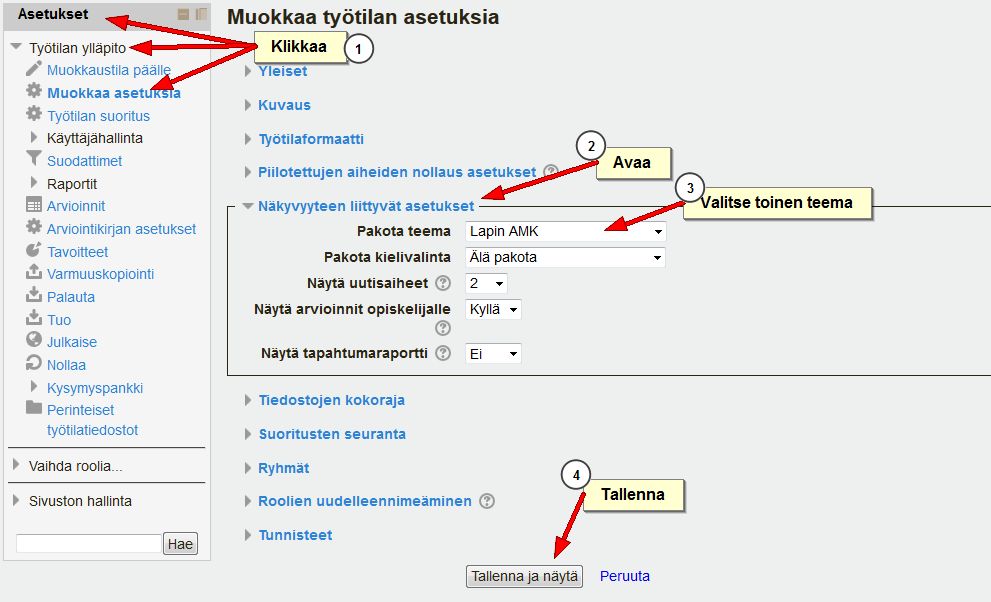
It may take a while before we can update our LapinAMK theme to a Moodle 3 version. Until that time teachers might choose to replace this theme with a Moodle 3 theme like Klass, a theme with blue colours. Changing a course theme is done in the course settings:
Moodle 3 incorporates three new question types in the standard selection for Moodle quizzes. These quiz question types were developed by the British Open University and heve been available before as third party plugins. All three types involve the student dragging and dropping elements onto a larger element in order to complete it. This sounds abstract, so examples can clarify the idea.
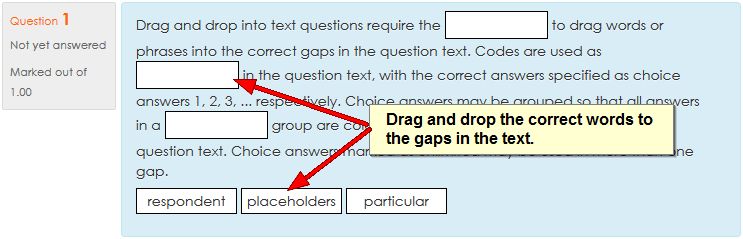
Drag text onto text (drag and drop into text)
The first type allow the creation of cloze texts where students do not fill in words, nor select them from a drop down list, but drag and drop them into the gaps in the text.
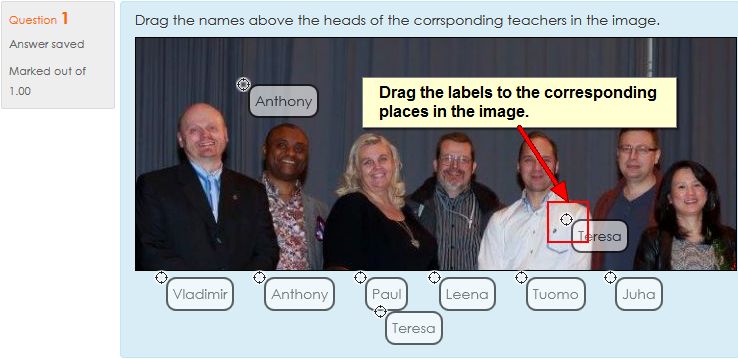
Drag text onto image (drag and drop markers)
The second type allows the student to drag and drop text labels onto a background image. The place where the label should go must be defined.
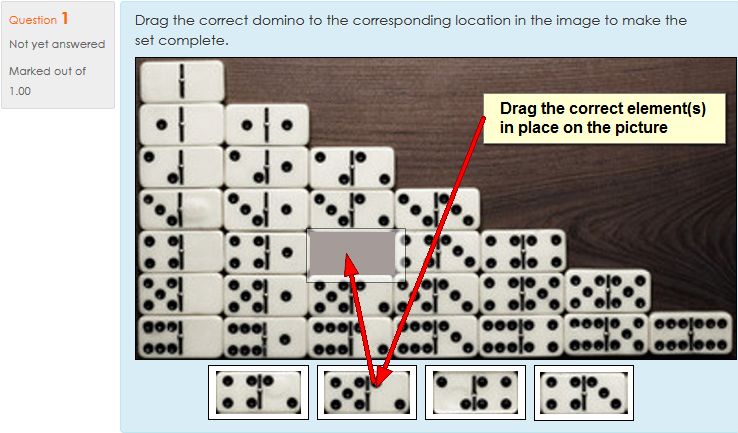
Drag image onto image (drag and drop onto image)
The third type allow the creation of tasks in which an image needs to be modified or completed by dragging one or more image elements onto the background image.
These new question types, especially the ones involving pictures, are a bit more complex to create than most of the other standard quiz question types. Therefore, they should not be used simply for the sake of having a cool image task in the quiz. However, for visualising specific understanding (e.g. how to complete an electrical circuit, where do intestines fit, etc.) they can be quite useful.
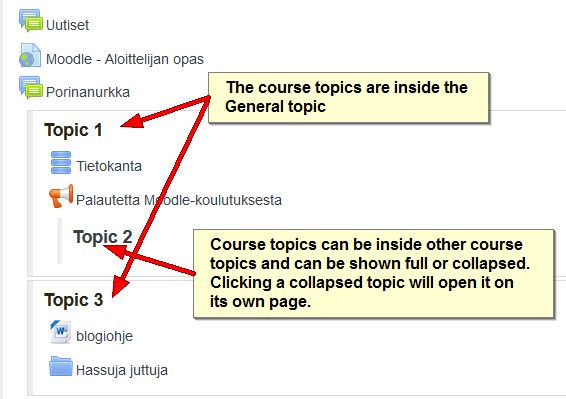
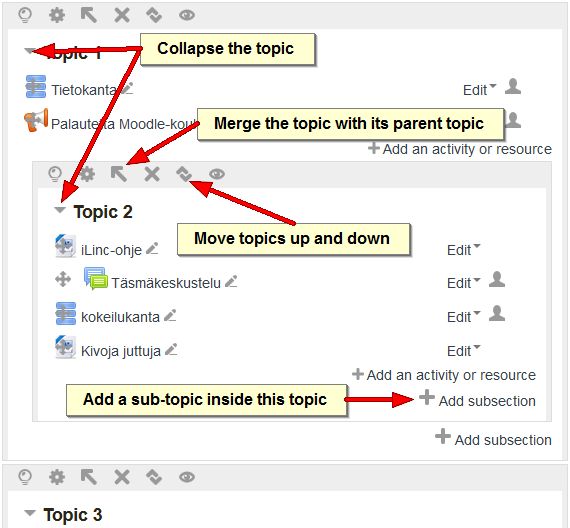
One of the new plugins in Moodle 3 is a course format called “Flexible sections”. It allows sections/topics to be placed within other sections in either open or collapsed form. The collapsed section links will open the section on its own page when clicked. Note that this new format may not work with some of the older Moodle themes! Changing the course format back to the default Topics format, will return the sections to their normal positions.
A course page with flexible sections enabled.
When editing is turned on more options become available to manage the sections.
The assignment module in Moodle 3 looks almost the same as in Moodle 2.7. In the assignment settings you may notice that under submission types, if on-line text is chosen as submission type, a maximum word limit may be set, so as to force students to adhere to brevity, for example, in summaries or reports.
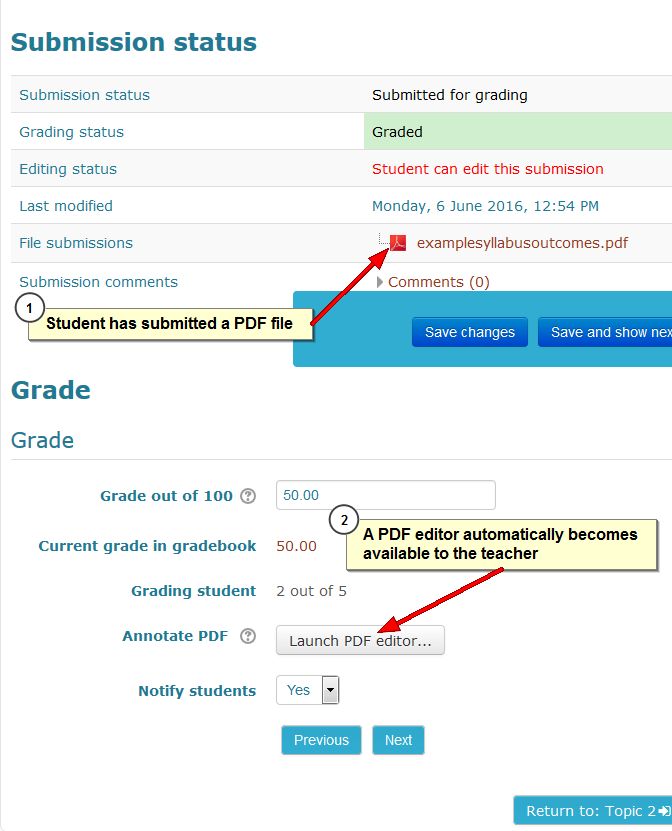
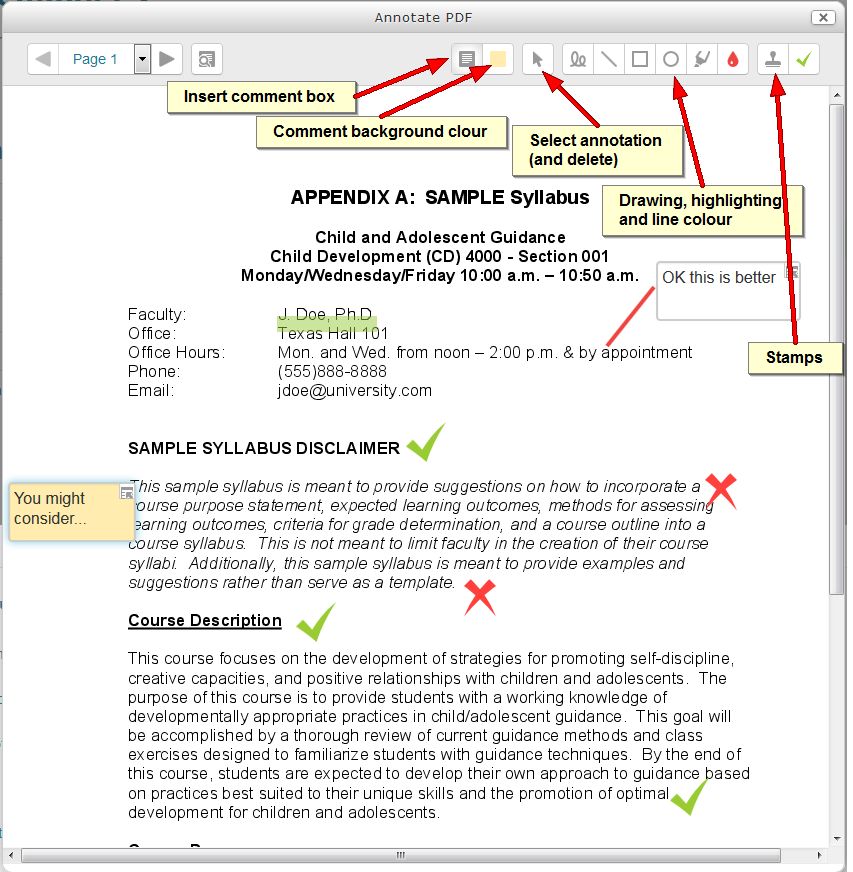
The most notable new feature in the assignment, however, only becomes visible when a student submits a PDF file. PDF files are unwieldy and sometimes impossible to annotate for teachers. To deal with this, Moodle 3 contains a simple PDF editor, as shown in the pictures below:
The PDF editor button becomes available only when a PDF file is submitted.
The annotation tools are a bit crude and take some getting used to, but they are essentially functional.
The upgrade of Lapinkampus Moodle and Open Moodle to version 3 and up will not cause drastic shifts in the functionality of the environment, but will bring about a great number of incremental improvements. Some of these improvements and additional functionality will be highlighted in this and subsequent entries.
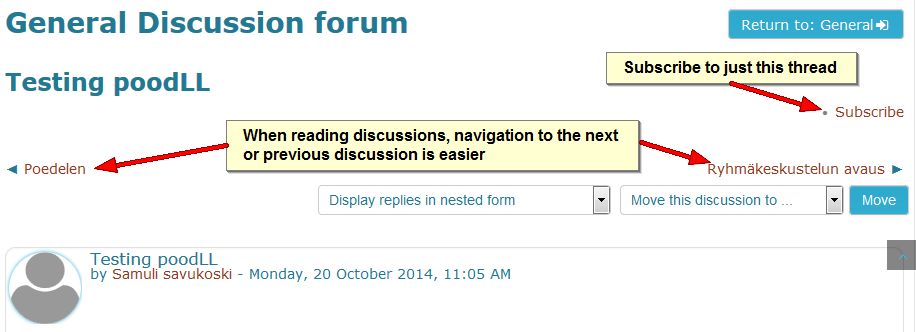
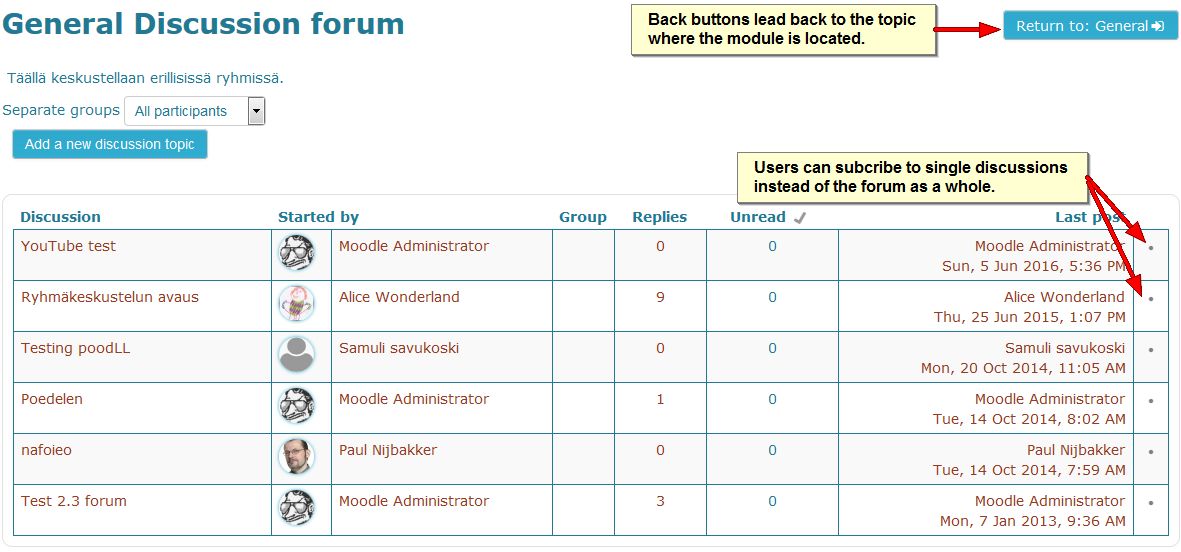
The Forum module in Moodle is the most used and most flexible tool that can perform almost all functions of the assignment module (including the Urkund plagiarism check), but combines it with the interactivity of a discussion tool. In the upgrade from Moodle version 2.7 to 3.0 the Forum will aquire a few improvements which are shown on the images below:
When writing forum messages users in a group forum can decide to post their message in all the groups that they have access to.
In a forum it has become easier to navigate between discussion threads and it is now possible to subscribe to only one discussion.
Subscription to single threads can also be done on the forum page. Also note that the back button now returns to the same topic you departed from.
Mitä tapahtuikaan kevään aikana Lapin ammattikorkeakoulussa verkko-opetuksen saralla? Meni hetki ennen kuin asiat alkoivat palautua mieleen. Perustukityön, siis opettajien ja opiskelijoiden tukemisen ja kouluttamisen lisäksi tehtiin ainakin seuraavaa kehittämistyötä.
Pilotoitiin GAFEa (Google Apps for Education) YAMK-opinnoissa. Palauteraporttia ja yhteenvetoa tästä on tulossa elokuussa.
Tuettiin opettajia flipped classroom –ajattelun soveltamisessa, käytännössä mm. tehtiin tallenteita HangOuts on Air –sovelluksella. Ensimmäiset tällä tavalla toteutetut opintojaksot ovat toteutuksessa kesäopintoina.
Striimattiin ensimmäisiä kertoja YouTubeen seminaareja.
Laitettiin Optima ”pakettiin”, käyttö loppuu 30.6.2015.
Tehtiin opintojaksoja ”non-stop-tarjontaan” ja tuettiin näiden tuottamista. Homma on hyvällä alulla.
Valmistauduttiin Moodlen päivitykseen versioon 2.7.+. Päivitys tehdään 1.7. Työn alla viellä mm. integraatio O365-palveluun
Saatettiin loppuun KIRLAPPI-hanke. Hankkeessa tuotiin alueelle kirjasto- ja tietopalvelualan AMK-tutkintokoulutusta. Hankkeen tuloksista voi lukea mm. näistä parista julkaisusta.
Ideoitiin opiskelijan henkilökohtaisen oppimisympäristön toteutusmallia. Tämä voi olla onnistuessaan iso juttu :).
Ja luultavasti tehtiin paljon muutakin, mitä en nyt vain muista. Tiimiläiset voivat kommentoiden lisätä tähän asioita. Elokuussa sitten lisää näistä ja syksyn muista jutuista.
Hyvää kesää ja lomaa!
Päivystävän tukihenkilön tiedot löydät osoitteesta eoppimispalvelut.fi
Tammikuussa 2014 toimintansa aloittava Lapin ammattikorkeakoulu tulee käyttämään oppimisalustanaan Moodlea. Tämä tarkoittaa Rovaniemen kampuksella vaiheittaista siirtymistä Optimasta Moodleen. Siirtymäaikataulu on seuraava:
Kevät 2014 Teollisuuden ja luonnonvarojen osaamisala
Syksy 2014 Matkailupalveluiden, Kaupan ja kulttuurin osaamisala
Kevät 2015 Hyvinvointipalveluiden osaamisala
Nopeammassa aikataulussa siirtyvät yhteiset täydennyskoulutuskokonaisuudet, kesäopinnot ja valinnaiset opinnot.
Muutos koskee samanaikaisesti sekä uusia että vanhoja opiskelijoita. Osaamisalojen välillä on siirtymässä liukumaa siten, että aloittavien opiskelijoiden ei tarvitse opiskella vanhaa järjestelmää puolen vuoden käyttöajan vuoksi, vaan he ottavat käyttöön suoraan uuden järjestelmän. Näistä informoidaan opiskelijaryhmiä tapauskohtaisesti. Opiskelijat saavat perehdytyksen Moodleen.
Opettajat koulutukset käynnistyvät ensimmäisenä. Lisäksi osaamisaloilla on siirtymävaiheessa tarjolla tehostettu etä- ja verkko-opintojen tukipalvelu (vierituki), joka auttaa opettajia verkko-oppimateriaalien ja –oppimisprosessin suunnittelussa ja toteuttamisessa uuteen ympäristöön. Otetaan tämä mahdollisuutena uudistaa omia verkko-opintojaksoja ja oppia uutta :).
Luonnollisesti myös Moodlen ulkoasu muuttuu, Moodle Lapin kampuksen suunnittelu on jo täydessä vauhdissa. Käyttäjillä on mahdollista antaa palautetta ja kertoa toiveita Moodlen käytettävyydestä täällä.
Imagine, dear reader, that you need to choose a car and in the village where you live there are two car dealerships. The dealer nearest to your home offers you a brand new Mercedes for free and then there is another dealer who offers you a Lada for a lot of money. The choice already seems obvious, but some people in your family seem to think that it does not really matter which one you choose. After all, they say, both the Mercedes and the Lada have four wheels and they both can take you from A to B. That is true, of course, so let us then look a little closer at the cars on offer.
The Lada may not go the distance…
The Mercedes is the most widely used car in the world and many people own several of them, because they are given away for free. The Lada is unfortunately only available from this one dealer in your village and it costs a lot of money; there are consequently few of those cars on the road. Even in your village there are more Mercedes owners than Lada drivers. International comparative polls show that Mercedes owners are very satisfied with their car. Lada has not participated in such polls.
There are Mercedes dealerships in all countries, but you do not have to use them. If you should have a problem with the car, you can get it fixed anywhere you choose, or you can even fix it yourself. The Lada dealer on the other hand does not allow you to fix the car yourself, you are not even allowed to look at the engine! If it breaks down, you must take the car to this one dealer to have it fixed.
The Lada dealer is also the only one who sells a few accessories for the Lada, while you can get hundreds of free accessories for the Mercedes at many shops. The Mercedes also comes in many different colours and models. The Lada on the other hand is available only in one drab colour and the interior design is still the same as it was when the Soviet Union still existed.
The Mercedes offers a very flexible form of transportation. It can carry a handful of primary school children or thousands of university students without any additional cost. In contrast, although the Lada can carry multiple passengers too, you have to pay the dealer for every extra seat. All things considered, although you are allowed to drive the Lada, it is never really your own. The Mercedes, however, is yours to do with as you please, a home away from home.
Finally, the Mercedes is also clearly the more modern car. It includes options for interfacing with the latest technologies, which the Lada lacks. The Mercedes in other words will take you much further than the Lada will. The Lada dealer knows this very well, for he also sells Benz cars (which are just Mercedes cars with another name). The Lada will soon be a thing of the past.