Categories
eOppimispalvelut Moodle

Uusi Poodll Lapinkampus Moodlessa / Upgraded Poodll plugins in Lapinkampus Moodle 3.1

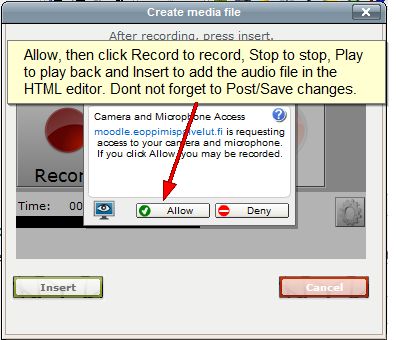
What with the upgrade of Lapikampus Moodle to version 3.1, the Poodle recording plugins have been upgraded too. Poodll 3 offers recording via HTML5, which is more suitable for mobile devices. As a result the look of the recorders in Moodle has changed. The picture below shows the MP3 recorder (the Finnish version) as it now looks in the HTML editors in Moodle. This example is from a discussion forum (click on the pic for a bigger version):
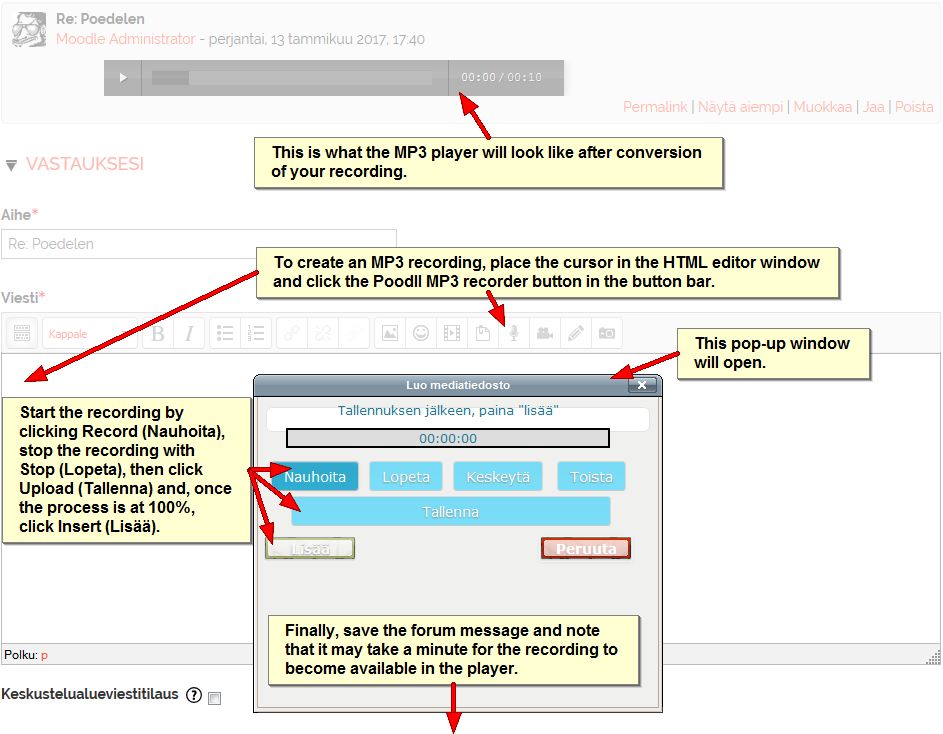
HTML5 has been described as the future of the Web (That is probably why it does not work in Internet Explorer!). The Poodll HTML5 MP3 recorder uses recording via the cloud. As a result the recording must be uploaded and converted, which may cause a slight delay before it becomes available. Recording via the cloud has the added advantage that the Poodll video recorder (which uses a very similar pop-up window to the one above) that until now could only record short clips (due to the file size limit in the Moodle server) will now allow recordings of over 5 minutes in length. The exact limit may depend on the device and connection used.

Note that older browsers like Internet Explorer cannot handle HTML5 properly. The recommended browser for Poodll is the latest version of Mozilla Firefox!
Categories
eOppimispalvelut Moodle

Introducing PoodLL

For many years Lapinkampus Moodle has relied on the small audio plugin NanoGong to provide users with an internal audio recorder in the Moodle HTML text editor. While NanoGong still works, developments on the Internet have overtaken it. Unsuspecting users trying NanoGong for the first time can be faced with a multitude of Java warnings and pop-ups (depending on the browser used) and this may discourage them. Therefore, the eLearning Services have selected an alternative audio recorder that is easier to use and that has better development prospects due to its ability to use HTML5 (the future web standard). This new recorder is called PoodLL and it offers audio recording options in places where NanoGong could not. It also offers options for (very) short video recordings, or simple whiteboard drawings in the HTML editor.

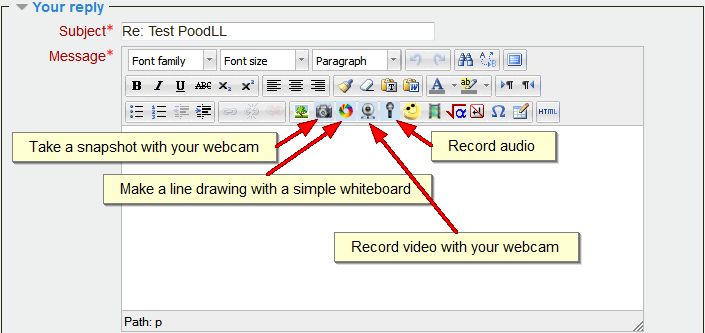
Presently, the Moodle administrator has installed PoodLL in the HTML editor, which offers recording options in the same places as NanoGong did. The functions can be accessed via icons in the button bar of the HTML editor in Moodle:

PoodLL in the button bar of the HTML editor

The interface of the four functions is really simple and self-explanatory. In the case of the audio (MP3) recorder, once you have opened it, all you need to do is allow the tool to use your mic and then you can record, pause, stop and play back, pretty much like in NanoGong. Once you are done with the recording, you click the Insert button to insert the recording into the HTML text window. After that it is a matter of saving the text (or posting the message, when you are in a forum, as in the example).

PoodLL MP3 recorder pop-up

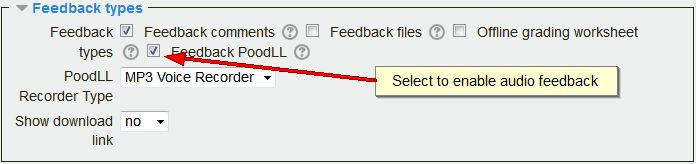
Apart from the general PoodLL access, there is a special plugin that now gives teachers the option to provide spoken feedback in assignments (rather than by writing comments and/or uploading a response file). This option can be enabled in the feedback settings of a Moodle assignment.

PoodLL assignment feedback setting

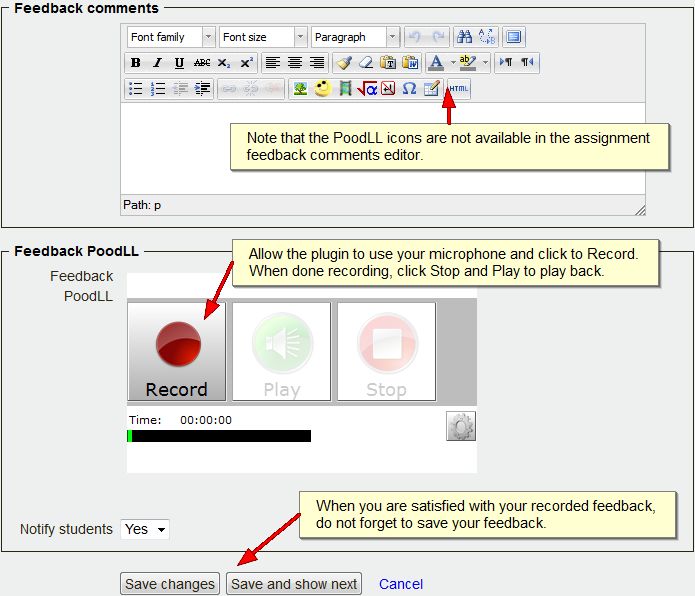
When enabled it provides the teacher with a PoodLL MP3 recorder on the grading page of each student as shown below:

The PoodLL MP3 recorder on the grading page

Apart from the above functionality, special PoodLL audio submission plugins are available for the Moodle assignment, database and quiz module. These allow students to easily submit a recording for grading. These plugins have not been enabled yet, but they will be installed if teachers have a need for this functionality.

Note that, although the NanoGong recorder is no longer available, existing NanoGong recordings in Lapinkampus Moodle will continue to work as before.