One of the major differences between Moodle 2 and the familiar 1.9 version is the totally new file system. In Moodle 1.9 files in a course were either uploaded to the course Files and then linked to various places in the course, or they were linked from the Internet. The latter was a laborious process of finding the resource on the Internet, copying the link and adding it in a Moodle resource. This made it impractical to have too much material on the Internet and consequently the course Files folders filled up with files.
To deal with this Moodle 2 introduced the new file system that still can link to Internet pages or pictures in the old way, but that has a decided advantage in that it can also use so-called repositories. Repositories are internal (i.e. inside Moodle) or external databases where files are stored. The new File picker can connect to those repositories, so that you can link to, or upload, these files in your course material, straight, often without the need to log in to outside sites and without needing to upload files downloaded elsewhere.

There is a list of available repositories in Lappia Moodle. The internal repositories comprise the old Legacy course files folder, the Recent files, your Private files and the Server files. It depends on where you are in Moodle and what your role, or level of access, is, whether you can see all of these in your File picker. The external repositories include Google docs, Dropbox, Wikimedia (picture database of Wikipedia), Picasa (picture database) and YouTube (video database). The list of repository plugins is however much longer and contains services like Alfresco, Box.net, WebDAV, Amazon and Flickr. These can be added to Lappia Moodle upon request from the users. In addition there is a plugin to include any file folder in the Moodle server as a repository.
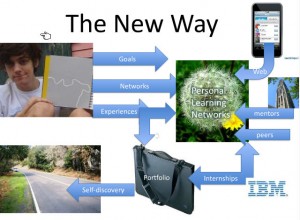
You cannot upload files to repositories via Moodle, but your can draw files from the repositories into Moodle. Repositories are thus the opposite of portfolios, that are meant to save files from Moodle. Presently, Lappia Moodle utilises only the Mahara e-portfolio. In the foreseeable future Mahara may also become available as a repository.

 kautta Moodlen käyttäjätunnuksilla. Maharan käyttäjäprofiilitiedot ovat kerätty käyttäjänMoodle -käyttäjäprofiilista. Maharan käyttäjäprofiilitietoja voidaan kuitenkin laajentaa esimerkiksi ansioluettelolla, jolloin käyttäjällä on mahdollista luoda oma online CV.
 Users can access Lappia Mahara only via Lappia Moodle. There is no separate login required. New users in Mahara will find that their Mahara Profile contains information taken from their Moodle user profile. The Mahara profile can however be extended with resumé data, so as to create an online C.V.